
Tag: Tips
Google Chrome Tip: Reclaim Hijacked New Tab Page
 The joys of installing everything.
If for one reason or another your browser’s new tab page screen has suddenly changed, there is a high probability that it was just hijacked by the 3rd party extension(s) such as: good-search, conduit, searching4all and similar names.
Fortunately, not all is lost yet and you can claim it back by following these simple steps:
Continue Reading
Tip: Instagram For Opera’s Speed Dial Tile
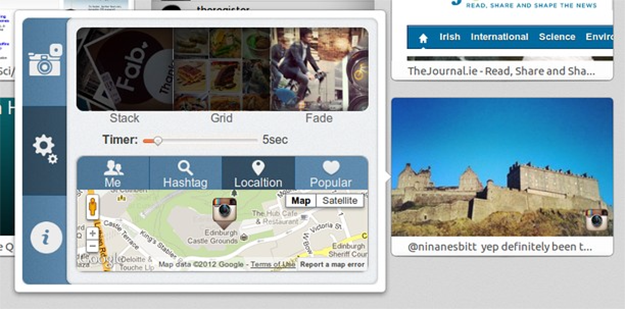
If you are addicted to both Opera and Instagram then here is something to distract you even more: a Speed Dial extension, which displays photos from your album.
Sounds interesting? Then head over to the following page and download the “Speedie-gram” add-on.
[Via: my.opera.com]
Opera: How To Restore Destroyed Bookmarks
 Did Opera just overwrote all your bookmarks? Not all is lost, yet.
Today, due to my mistake and a possible bug in the latest build of the Opera 12.2 (Build: 1627), I have lost all my bookmarks, ranging from 2004 till this day.
Now, although I had a backup, the recently changed location of the Opera bookmarks file (I’ve moved it to another drive), it did not include the data. Needless to say, I wasn’t very happy.
How did this happen?
Continue Reading
How To Create A New Default Firefox Experience In Your Enterprise
 This is a guest post by Mike Kaply.
As a developer or designer, how often are you satisfied with “off the shelf”? Templates are great because they offer a natural jumping off point for your creativity, but if it were a “take it or leave it” proposition – most of us would leave it.
The Internet browser is no different. Firefox and Chrome are the jumping off point for providing the essentials for navigating the web, but to really make it work for you, there’s a universe of add-ons and extensions to customize the experience.
Continue Reading
Tips: Opera, Load Flash, Java On Click
If you don’t want the Flash or Java content to be loaded when you visit web sites, here is a simple trick, which will load plug-ins on demand (aka when you click on the content).
– Go to Preferences (CTRL+F12) > Advanced > Content
– Check “Enable plug-ins only on demand”
– Save settings
[Thanks, Sjano]
Tips: Opera 12, Enable Favicons
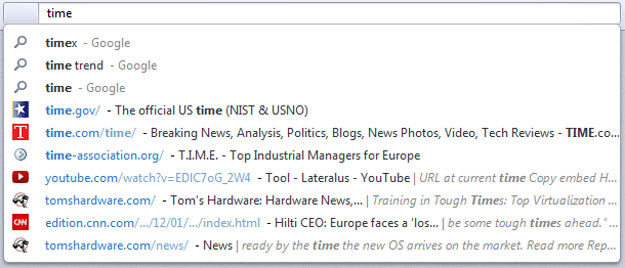
As you might know (and hate), Opera has favions turned off by default, which makes you rely on text instead of pictures and boy does that take time… As the majority of designers will tell you, it’s a perfect example on what not to do.
Thankfully, with the latest Opera 12 build, you can finally turn on favicons and enjoy the colorful experience.
Here is how:
Open the following URL.
Set and restart.
That’s it.
Opera Link For Windows Phone 7
 While other web browser developers are yet to jump into the Windows Phone bandwagon, Martin Rauscher went ahead and published a WP7 app, which, thanks to Opera’s Link API, allows you to access your Bookmarks, Notes and Speed Dial from a variety of different Opera browsers, including:
Opera Desktop
Opera Mobile
Opera Mini
Continue Reading
YouTube Crashing In Chrome? Here’s How To Fix That
Over the course of last few last days, a huge amount of Google Chrome users have started experiencing crashes when surfing YouTutbe web site. While the search giant is presumably working on a way to fix that, here is what you can do to stop crashes from happening again:
– Right click on the video
– Click “Stop Downloading” before you close the tab
– Job done
[Via reddit]
Opera: Go Back To Previous Page Without Reloading It
Works for going forward as well.
If for one reason or another you would like to go back to the previous page without waiting for it to reload, here is a setting to speed up your browsing experience:
Paste the following code to your address bar
opera:config#History%20Navigation%20Mode
Set “History Navigation Mode” to 3
Done.
That was easy, wasn’t?
[Via: reddit]
Opera: How To Backup Opera Mail, RSS Feeds, Bookmarks, Passwords And Other Data
It’s always important to backup your data, especially when it comes to your web browser. Thankfully, there are a couple of tools to do that, from cloud based servers to local ones. Here’s how you can backup Opera to your USB Flash drive or just a regular HDD:
– Download FavBackup
– Menu: Backup > Opera
Continue Reading


