
Tag: Tips
Google Chrome Tip: Block Star Wars: The Force Awakens Spoilers
 I’m not your father.
If you are not going to watch the Star Wars: The Force Awakens movie as soon as it is released and would like to save yourself from potentially ruining your own mood by reading spoilers, then here is a tip for you.
A company called Priceless Misc has developed an extension called “Force Block”, which will block pages that are likely to spoil the movie, it also includes whitelisting in case of a false alarm as well as pattern detection.
Continue Reading
Tip: How to Completely Flush DNS / Socket Cache in Chrome
 Or any other, Chromium based web browser.
If you have recently changed site nameservers, migrated web hosting, simply seeing sites with old content, or for any other reason need to clear your DNS Cache and it is not working, here is how you do it properly:
Assuming you have already done the usual (OS level cleaning, which you can read more about here):
> Type “chrome://net-internals/#dns” in the address bar and click “Clear host cache” button.
> Type “chrome://net-internals/#sockets” and hit on the “flush socket pools” button.
> Lastly, simply clear Google Chrome Cache by going to Menu > Settings > History > Clear browsing data
Continue Reading
Vivaldi Browser: Fix Not Starting, Reinstall and Other Issues
 Will work for other, Chromium based web browsers too.
If you are running the latest preview build of the Windows 10 then I am pretty certain that Vivaldi x84-64 is not working for you and you have no idea why. It’s just sitting there, in the task manager and does nothing. You might have already tried reinstalling browser, deleting sessions or even the entire profile but will not help.
The reason? Windows 10 recently changed the way it handles memory and it broke the unauthorized Google hack that saved the search giant a whooping $9,995 (that’s how much it costs to get the tools for the 64 bit systems from Microsoft).
Continue Reading
5 Vivaldi Browser Tips: Remove The Red Skin Glow, Sidebar & More
As I’ve been using Vivaldi browser more and more, there have been some things that annoyed me and for which I though there was never a setting (with the exception of sidebar).
In any case, today I’d like to share with you 4 tips that (at least in my eyes) make browsing experience much better.
Transforming it from this
Continue Reading
Firefox Add-Ons: MetroTab
 Modern UI for your new tab window.
If you love the Windows 8 look & feel then you will enjoy the Firefox metroTab extension. After installation, you will be able to pin and customize your new tab page with tiles, meaning pinning web sites, see weather information and more.
According to developer, it “also, includes some tiles that can retrieve information from their page and show it to the user in the same page.”
Must Have Google Chrome Extensions
Now here’s a quickie.
If you have some time to spare, there is a pretty popular thread at ask.reddit with over 4000 comments of people sharing their favorite Google Chrome extensions.
Check it out. Maybe you will find something useful.
Speed Up Online Reading With This Google Chrome Extension
And it might actually work.
If you’ve been wondering what kind of magic tricks can be self-taught in order to speed up your reading experience, then BeeLine Reader might very well be something worth checking out.
So what is it all about? Basically, once you install the extension and click on a little button that will appear in your bookmarks bar, the text will be reformatted into something like this:
Continue Reading
Tips: Disable Firefox’s Telemetry Data
If you are concerned about your privacy after reading Mozilla’s statements, here is a simple tip to disable all telemetry data collecting. Go to:
Settings > Advanced
Click on the “Data Choices” tab
Uncheck the “Enable Telemetry” box
That’s it, as simple as that.
Tip: Extract Web Site’s Color Scheme
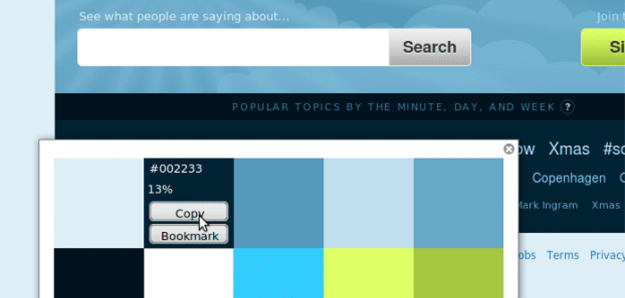
Now here is something for the Firefox web developers. If you’ve been looking for an easy tool to quickly parse the color scheme of the web site that suits your taste (from images and CSS), then “Rainbow Color Tools” is the add-on you’ve been waiting for.
In addition to that, you can also use RCT as a color picker and save them for the later use.
Continue Reading
Tip: Save Money On Airline Tickets
What do web browsers and buying airplane tickets have in common? Cookies. So how do you save cash? Use private browsing mode (also known as incognito mode). One of redditors shared an interesting story on how various companies artificially inflate prices and how can you beat them.
Here’s what he had to say:
When purchasing items on the Internet (especially airline tickets), use incognito mode on your browser.
We use your own cookies against you: raising the price on tickets the more times you check, as you shop around for better deals. That way you’ll think the price is going up or that seats are being actively sold – thus increasing your urgency to buy, and punishing you for trying to get a good deal.


