
Tag: Tips
Weekly Browsers Recap, October 10th

- Microsoft slates IE bug fix for next week
- IE: Building Offline Experiences with HTML5 AppCache and IndexedDB
- NSS Labs Offers Reward Money for Fresh Exploits
- A few new tab tricks for Firefox
- Great Dark Theme for Firefox
- Google Chrome Stable Channel Update
- Google Chrome Beta Channel Update
- Google Chrome Dev Channel Update
- Opera Featherweight and plugin installation improves, plus important fixes
- Opera Mobile 11.1 for Symbian Belle Review
- How many Flash Player updates is too many?
Weekly Browsers Recap, October 3rd
- Internet Explorer 9 on Windows 7 Passes 30% Share in the US
- CSS3 text-shadow in IE10
- IE9 Mobile Developer Overview
- Double Trojan infects IE, Firefox in one swoop
- Firefox devs mull dumping Java to stop BEAST attacks
- Top 9 Firefox fixes
- Firefox 3.6.23 security update now available
- Google’s Chrome browser: Coming soon to Android?
- Google Chrome Stable and Beta Channel Updates
- Google Chrome Dev Channel Update
- Opera: Amazon’s Silk Browser is Flattering, But Five Years Late
- Opera: A shining new [bookmark] star
- HTML5 Template Generators, Frameworks And Tools
[Thanks, Ichan, RamaSubbu SK, Shane Bundy]
Weekly Browsers Recap, September 26th
- Touch Input for IE10 and Metro style Apps
- Firefox Enterprise Support: Mozilla Changes Its Tune
- Firefox Memory Leaks Once Again Causing Frustrations
- Google Chrome should be the standard Browser on the Motorola lapdock
- Google Chrome Stable Channel Update
- Google Chrome Beta Release
- Google Chrome Dev Channel Update
- Opera: Speed Dial Laundry Day
- Best Android browser 2011: which should you use?
- Opera Mobile on Android x86 at IDF 2011
- Opera Mini 6.1 for Symbian gets an update
- Updated Opera Mobile 11.1 for Symbian released
- RockMelt: Does the world need another Web browser?
- Maxthon Mobile: The Right Browser for the Samsung Galaxy S II
- Dolphin Browser HD: The Best iPad Browser Not Named Safari
[Thanks, Mikah]
Opera: Increase Default Text Size (Web Page Zoom Level)
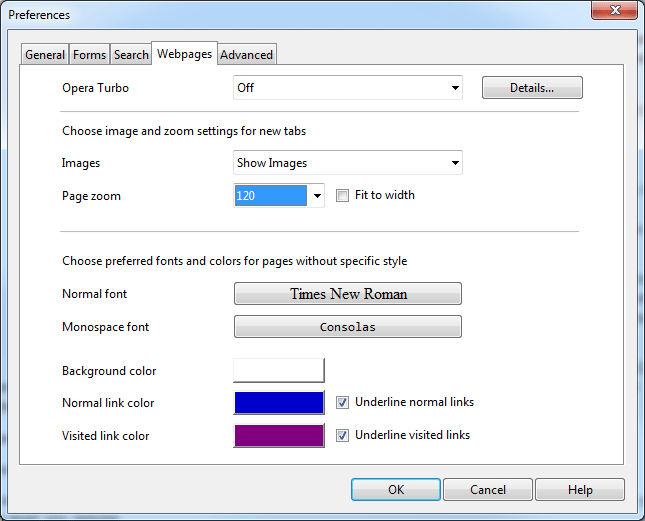
If you don’t feel like reading small font size words in various web pages and can’t really be bothered to zoom in all the time, we have a simple solution: set a default page zoom level. Here is how:
Continue Reading
Weekly Browsers Recap, September 19th
- IE: Site Ready WebSockets
- How to suspend individual tabs in Chrome or Firefox
- Microsoft Windows 8 beats Google Chrome OS
- Google Chrome Surpasses 100,000 Revisions
- Google Chrome Beta Channel Update
- Google Chrome Dev Channel Update
- Opera Mobile: Android 11.1 update 2 ready for download
- Get Word Definitions Right in Safari with Tap Dictionary
- Dolphin Web Browser Improves the iPad Experience
7 Web Browser Features To Save Your Time
 Time management as its best. Updated on 9/16/2011.
More than 4 years ago, I’ve wrote about a few things you can do to save your time and boost your productivity. Some are still relevant and some are not. Seeing how this post still receives some attention, here is an updated version, which now includes Google Chrome and Maxthon web browsers as well as 2 additional features.
The world moves fast, don’t you think so? It’s time to learn some tips and tricks and do everything at the speed of light. So to begin with, here are 7 web browser features that will help you to save a lot of time. So, here we go. 7 web browser features to save your time.
Continue Reading
Google Chrome Facebook Notifications Extension
Some time ago we have covered a Facebook add-on for Opera which allows you to preview notifications without actually visiting Facebook.
Well, good news for Google Chrome users, there is such extension for you as well. In addition to displaying the mentioned notifications, this one will also play the chat sound for your convenience.
Weekly Browsers Recap, September 12th
- Opinion: What Microsoft Must Accomplish in IE10
- Who Stole My Pictures Is a Firefox Extension That Helps You Locate Copied Images
- Google Chrome gets automatic single sign-on, brings security risks
- Google Chrome Dev Channel Update
- Google Chrome Beta Channel Update
- Researcher raps Apple for not blocking stolen SSL certificates
- Opera promises cross-platform apps for Smart TVs, gives us little to complain about
- One of the reasons why we made Opera Unite
- Opera Wahoo 12.00 Extensions improvements
Disable Opera Tips
 If you’ve been using Opera for a while and don’t really want to see tips about something you already know, here is how to disable them:
– Go to:
[Windows 7, Vista ]
C:\Users\
[Windows XP]
C:\Documents and Settings\
– Open tips.ini
– Change “Enabled=1” to “Enabled=0”
– Restart Opera
– Done
Weekly Browsers Recap, September 5th
- Internet Explorer 9 Reaches 20% Usage Share
- IE: Browsing Without Plug-ins
- Introducing the IE9 on Windows Phone “Mango” User Agent String
- 10 Social Networking Add-Ons for Firefox
- Google’s Chrome Frame for IE ready for prime time
- Dutch CA banished for life from Chrome, Firefox
- Google Chrome Stable Channel Update
- Google Chrome Beta Channel Update
- Google Chrome Dev Channel Update
- Safari users still susceptible to attacks using fake DigiNotar certs
- New Wahoo 12.00 build with rendering and Speed Dial improvements
- Maxthon Browser 3.1.7.600 Beta Released
- Sleipnir for Mac
[Thanks, RamaSubbu SK, Sebastian, Shane Bundy]


