
Opera: Increase Default Text Size (Web Page Zoom Level)
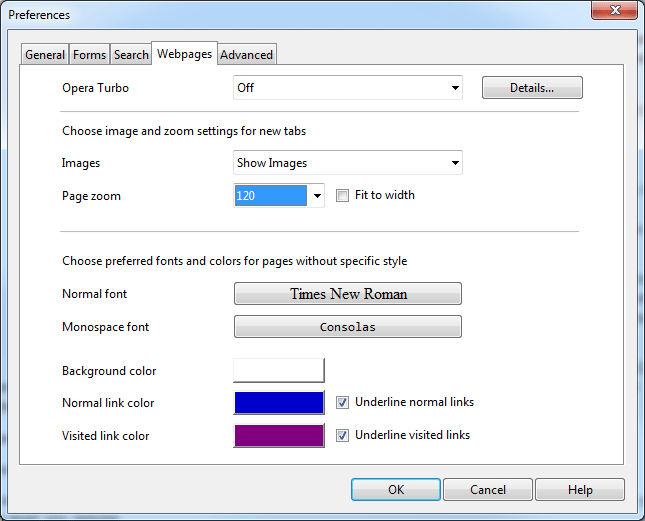
If you don’t feel like reading small font size words in various web pages and can’t really be bothered to zoom in all the time, we have a simple solution: set a default page zoom level. Here is how:
Go to “Preferences” or simply press (Alt+P)
Select “Webpages” tab
Set “Page zoom” to your desired level.
Done.
On a downside, you can’t change it to 130-140%, but I am sure this will change in a near future.

About (Author Profile)
Vygantas is a former web designer whose projects are used by companies such as AMD, NVIDIA and departed Westood Studios. Being passionate about software, Vygantas began his journalism career back in 2007 when he founded FavBrowser.com. Having said that, he is also an adrenaline junkie who enjoys good books, fitness activities and Forex trading.
Subscribe
If you enjoyed this article, subscribe to receive more just like it.


FYI you can change the size by putting this in the adders bar
opera:config#UserPrefs|Scale
for laptop screens you shouldn’t go over 125% and for screens of 40 inch and over 180%
“On a downside, you can’t change it to 130-140%, but I am sure this will change in a near future.”
then why the heck i can change mine to 1000(see pic below)
You trolling author?
or im too dumb to sense the sarcasm of the author of this post
other solution is to increase the “slide bar” below the right side of the browser screen to increase it further(max is 1000)
http://imgur.com/Pf9o1
crap..im really am dumb
hope opera add them but does it matter when you can increase to a larger size
oh well, i am really dumb
epic fail on my part
1000 isn’t 130 or 140. :P
No one’s too dumb. My point was: I wish it had zoom level settings similar of those when browsing aka where you can manually type in desired zoom level instead of selecting pre set settings :).
Read my post please you can change the size to what ever you want and the minimum size is 20% and the max is 300% any thing in between is possible
Why not simply set the minimum font size?
What a crappy site.
I would also advise to use minimum font size, changeable at:
Preferences(F12)->Advanced->Fonts
Then pick appropriately and changed minimum font size bottom right ;)
What you do think author? :)
(By the way, where can I see who wrote this article?
This is the best way, changing the page zoom size to larger will slow down the browser on the Peacekeeper benchmark compared to keeping the page zoom at 100%
Neat setting.
You can view the author via RSS subscription :)
Deleted
I hope you rename the article.
Sounds like Opera increased the default size. Makes it easy to misread.
You should change it but that depends if you want it to be misread intentionally *wink* *wink* *nudge* *nudge*
LOL
Do you mean increase reads as increase?
There’s a better option: https://addons.opera.com/en/addons/extensions/details/font-resizer/
Anybody finding the text too small on some sites the easiest & best option is to set the min font to larger in Opera preferences