
Internet Explorer (IE) vs. Safari vs. Firefox vs. Opera
It’s about time for another article. I really like unusual things to do, so will try something different this time too. You probably read dozens of articles with the similar name. Yes, it’s “Internet Explorer (IE) vs. Safari vs. Firefox vs. Opera”. However, I am not interested in web browsers features, speed at this moment. No, I will compare those web browsers web pages design. That’s right, enough of those regular “Internet Explorer (IE) vs. Safari vs. Firefox vs. Opera” articles. It’s time to try something new.
“Internet Explorer (IE) vs. Safari vs. Firefox vs. Opera” – Web Design Battle
I will analyze every web browser main web page and see how does it looks, what is good or bad, see if it renders correctly in every web browser (using browsershots.org), etc.
Before starting to review web design itself, let’s see how well it’s coded. We will use validator.w3.org.
http://www.microsoft.com/windows/products/winfamily/ie/default.mspx – This page is not Valid (no Doctype found)! Failed validation, 209 Errors
Ouch.
http://en.www.mozilla.com/en/firefox/ – This Page Is Valid XHTML 1.0 Strict!
Good coding. No errors.
http://www.apple.com/safari/ – This page is not Valid HTML 4.01 Transitional! Failed validation, 3 Errors
Haven’t passed this test, but only 3 errors were found. Not bad.
http://www.opera.com – This Page Is Valid XHTML 1.0 Strict!
Good coding. No errors.
Now we will use browsershots.org to see if web pages are being rendered correctly in any web browser.
Internet Explorer – didn’t rendered correctly in a few web browsers.
Firefox – renders correctly in any web browser.
Safari – didn’t rendered correctly in a few web browsers.
Opera – renders correctly in any web browser.
Please note: rendering tests maybe be not accurate due rendering software.
OK, we’ve passed some regular tests, let’s review start pages web design now.
Firefox
Click to Enlarge.
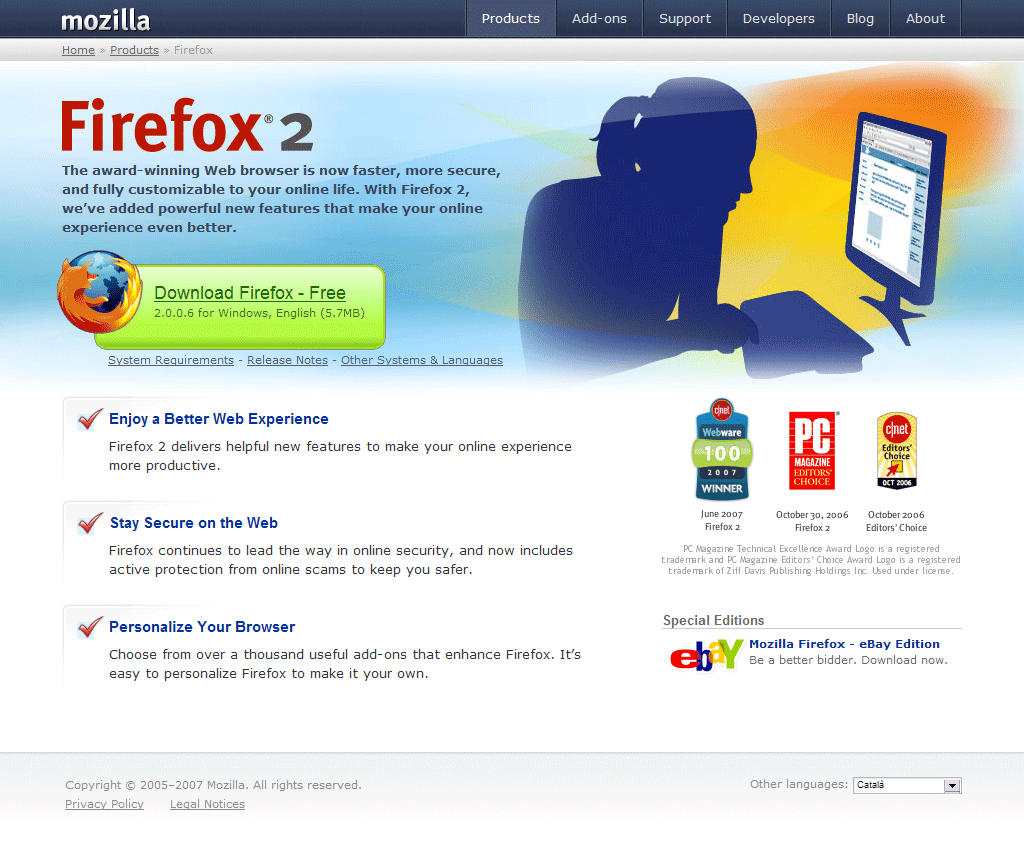
When you open web page for the first time, it gives you a very nice impression. Colors are very well organized; whole interface is not messed up with no need stuff. In the left there is very catchy “Download Firefox – Free” text/button so everyone will understand that this web browser is free. That’s a very good thing. Right after the text there is a version number, another great thing, helps you to know about the latest version and “Release Notes” tells you what’s new there.
Right after that, Firefox team presents some cool features, for example: “active protection”, “thousand useful add-ons”, etc. Although I think they should remove blue background from those red “check” markups, let’s go the right side now. We see awards, yet another great thing which can attract more potential users. In the footer I’ve also found a language selector, another plus. Now one more thing I didn’t like was their links system. “Download Firefox – Free” link is underlined which tells you that it’s a link, while links with text like “Enjoy a Better Web Experience” are more like promotional words than links, they are not underlined so you can’t say it’s a link (unless you mouse over on it). In the “Special Editions” corner there’s another different kind of link. This time when you mouse over, text become underlined. So there is like 3 different styles of linking which can confuse not experienced web surfers a bit.
Pros
- Catchy download button.
- Includes “FREE” in the start page.
- Version number included.
- Release notes.
- No validation errors.
- Site renders correctly in any web browser.
- Reasons to try Firefox.
- Possible to change language.
Cons
- Links system might be confusing to new web users.
Internet Explorer

Click to Enlarge.
Although Internet Explorer start page contains so many errors, it does look nice. Actually, for me Internet Explorer page is more beautiful than any other web browser. It contains nice glassy buttons, some effects and well chosen colors. In a few words I would call it “Vista style”. Right after navigation there are some new features listed, for example: New Look, Tabs, Printing, etc. which gives you a nice impression of what you can expect from Internet Explorer browser. You can’t instantly find “download” button as it’s not really separated from whole content, that’s a bad thing. Links (in the picture) also needs some improvements, “download”, “take a tour” and “watch video” are same size, color, but only two of them are links. Yes, there is a small “arrow” which should tell you something, but I think that “watch video” shouldn’t look same as links because it’s not a link and it’s not a good idea to confuse site visitors. Right after promotional picture you can find a list of new features and reasons to try this browser. One more thing which I didn’t like was advertising in the right corner, that’s not professional.
Pros
- Good looking site.
- New features listed.
- Reasons to try Internet Explorer 7.
Cons
- Lots of validation errors.
- Doesn’t renders well in all web browsers.
- Links system might be confusing to new web users.
- Advertising in the right corner.
Safari
Click to Enlarge.
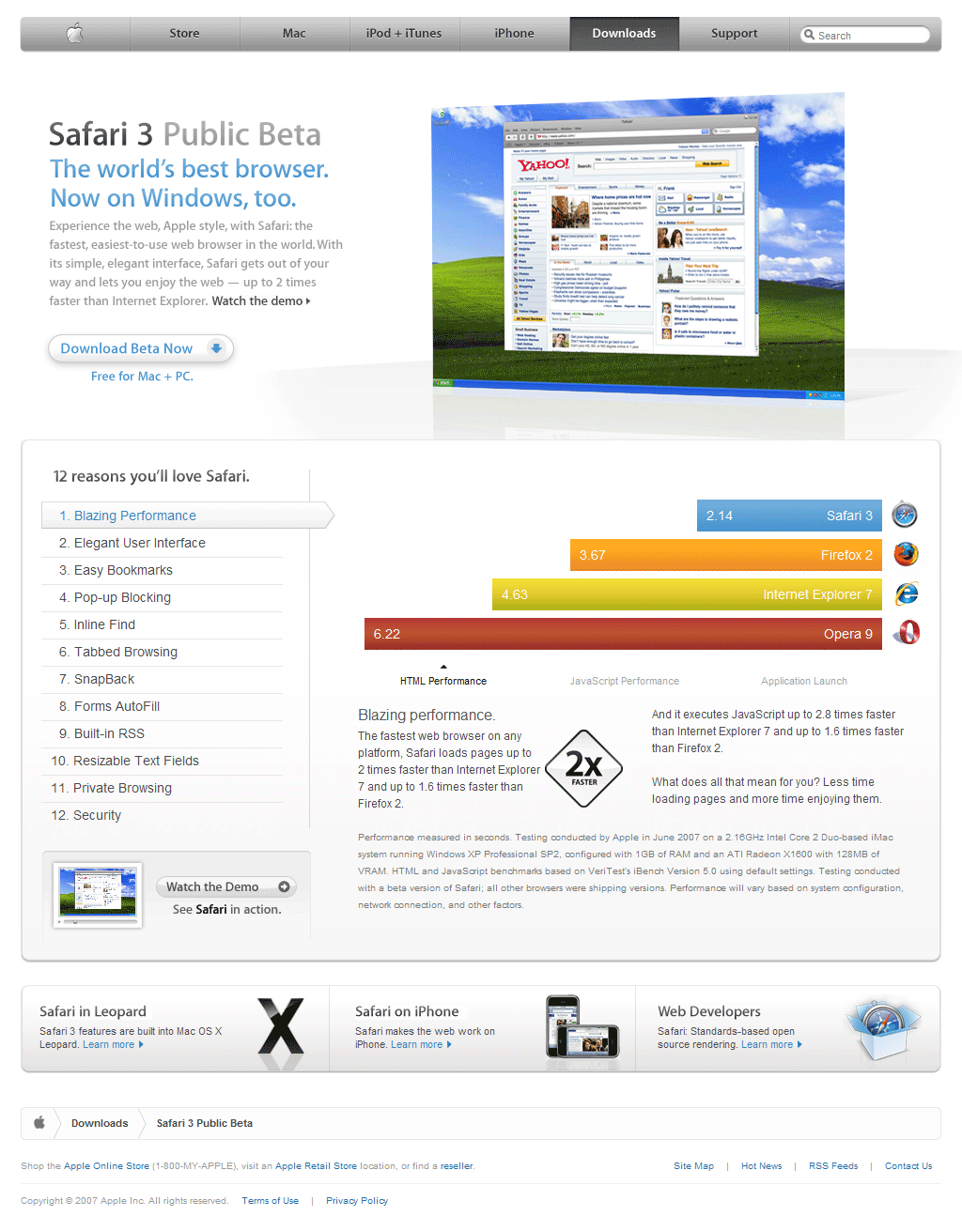
Right after I’ve opened this page, thought: grey… Grey color is dominating there, from top navigation to background. For me grey color is more like a depression color so I really don’t like Safari start page color scheme. However, not everything is bad here. Big screenshot instantly allows you to see how does Safari look and it’s pretty easy to notice “Download Beta Now” button too, although it’s not so catchy as Firefox one. If they could add a full version number, that would be great. Right after button you can find word “FREE”. Another great thing; before downloading users should know, whether this browser is free or not. What we see next is the top 12 reasons to try Safari, yet one more plus. I kind a like their way of showing those 12 reasons with some fading. Looks nice and doesn’t require new page loading. First reason is “Blazing Performance”, and here you go, we see performance graph. Of course, Safari is the winner there. Yes, that’s another big plus to Safari web design. This trick helps to convince users and try Safari 3 Beta.
Pros
- Reasons to try Safari.
- Includes “FREE” in the start page.
- Safari screenshot in the start page.
- Performance graphs.
- No new page loading required when viewing 12 reasons to try Safari.
Cons
- 3 validation errors.
- Grey (depressing color) dominates there.
Opera
Click to Enlarge.
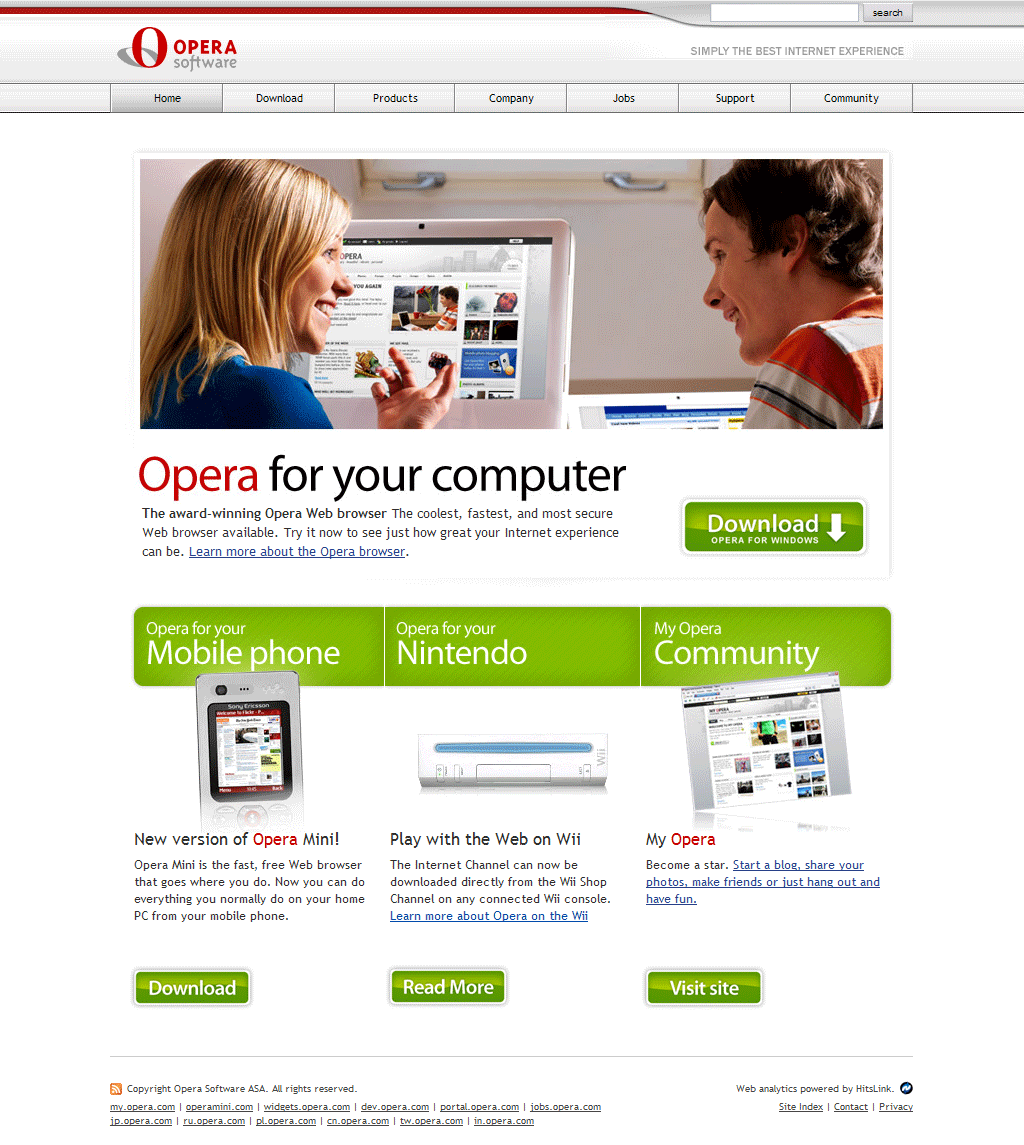
OK, no offense, but for me this new design is the worst one. I used to like their previous tries, for example this one:
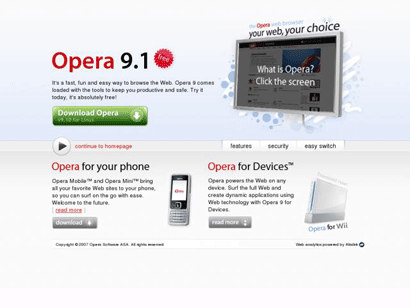
Not a perfect design (After Opera 9.2 it used to look even better), but much better than the current one. In the top I see old style grey buttons, not a good thing, it needs upgrade. After old navigation there’s a big picture, no idea why but it contains my.opera.com stuff and no browser screenshot, bad idea I would say. After that strange picture we see promotional text which says “The coolest, fastest, and most secure Web browser available”. Although that’s not a bad thing, but they should include some reasons why it’s so cool or so. In the right side we see green “Download” button. This button should include “FREE”, this is a MUST for Opera, click here to see why and that’s almost all, after download button we can find other “Opera Software” products promotions.
Pros
- No validation errors.
- Site renders correctly in any web browser.
Cons
- Old style navigation.
- No “reasons to try”.
- Only a few words of text.
- Where’s “FREE”?
Conclusion
If there would be a beauty contest, Internet Explorer start page would win, but it’s not all about beauty. Web design should render correctly in any web browser, contain most important information in the start page, have nice user friendly interface, etc. So… And the winner is… Firefox. It had no validation errors, nice interface, most important information listed, well chosen colors and much more. Regarding second place, probably that would be Safari, it had nice navigation and performance graph. Third goes Internet Explorer. I know, it’s cute design, but that’s not enough. And the last one… Opera. Start page needs serious improvements, maybe they will make a new design after Opera 9.5 is released, I don’t know.
Also, this is only my opinion.
EDIT: I’ve just rewrote my conclusion, Internet Explorer was in the second place due it’s beauty and third one – Safari. It’s really hard to decide.
What’s your favorite web design?
Like my posts? Subscribe.
EDIT2: Why those pages?
I have used Google Search and thought what would users type in order to find that web browser.
So it was like: Internet Explorer, Firefox, Safari, Opera. I took a first result (which most searchers clicks) and analyzed that page.
[digg-reddit-me]

About (Author Profile)
Vygantas is a former web designer whose projects are used by companies such as AMD, NVIDIA and departed Westood Studios. Being passionate about software, Vygantas began his journalism career back in 2007 when he founded FavBrowser.com. Having said that, he is also an adrenaline junkie who enjoys good books, fitness activities and Forex trading.
Subscribe
If you enjoyed this article, subscribe to receive more just like it.


Comments (74)
Trackback URL | Comments RSS Feed
Sites That Link to this Post
- Feedback request: What should we do to enhance Opera’s website? | August 16, 2007
- Firefox First Run Page… Come On » Web Browsers News and Reviews | September 5, 2007
- odd display on My Mac - Page 2 - Conservative Republican Discussion Forums | October 22, 2008
- A Pleasant Opera.com Design Change | November 21, 2008
Really great comparison! Thanks!
Nice comparison…. Look at Avant’s and Maxthon’s homepages, too.
I would say that because Safari’s performance tests have been shown to be very inaccurate due to using iBench, which is ancient software, biased for Safari, it gets last place. Lying on your homepage is a bigger no-no than having a poor homepage like Opera.
Nice comparison………………………….
Good comparisons, however, Opera (AFAIK) does not tag their browser FREE for some reason relating to the fact that commercial businesses or companies don’t get Opera for free. So there is a bit more to it than just popping the word free into the page. I’ve seen this mentioned several times across the community in the past.
Also, I strongly agree with IceArdor. ;) Good call.
kyleabaker, evidence please. Where did you see that mentioned? By who?
Don’t just make stuff up.
IceArdor,
Yes, their tests are not accurate, but I think that this trick really works, oh well… Life is not fair ;-)
kyleabaker, they could add “FREE” somewhere, as when you click Download on that, it downlods Opera Desktop Browser, but not their paid one (mobile) :-)
Just my 2 cents.
@lame
It has to do with their business marketing side.
http://www.opera.com/company/business/
Do a search for yourself or contact an Opera dev and ask them before you accuse me of making stuff up. I’d like to see FREE stamped next to the download button just as much as you, but accusing me of making up a reason for as to why they don’t already do this is just pointless. ;) Opera offers what they call premium support for companies/businesses which is what I’m referring to, which is where they make money off of the desktop browser. It wasn’t that long ago, few months, that they removed the “Buy” button from the top menu on Opera.com..
http://www.opera.com/img/screenshots/opera754-tabbed-screen.jpg
..do a little searching lame.
EDIT2: Why those pages?
I have used Google Search and thought what would users type in order to find that web browser.
So it was like: Internet Explorer, Firefox, Safari, Opera. I took a first result (which most searchers clicks) and analyzed that page.
———-
what is the point of this article? lol comparing the websites? whats the pooint if the product is good and the website is bad? or vice versa? and plus there havent been any recent comparisons of all four so u should do that!
You should update this comparison. The new Opera front site is now worse.
So basically, kyleabaker, you are making up the claim that Opera “does not tag their browser FREE for some reason relating to the fact that commercial businesses or companies don’t get Opera for free”?
You didn’t actually hear it from Opera. You just ASSUMED that it was that way?
If this is just SPECULATION or your OPINION you should clearly state so, and not pretend that it is a fact, or something Opera Software told you.
You want ME to ask an Opera developer to verify a baseless assumption? Why don’t YOU provide me with the evidence rather than asking ME to get the evidence for you?
concered dude,
Because web design is a face of those companies. I am also sure that it affects downloads ratio as well.
You may also read http://meiert.com/en/blog/20070113/web-design-15-important-research-findings-you-should-know/ there are some interesting facts listed.
http://falkow.blogsite.com/public/blog/57764
“This usability guru’s research shows users expect 77% of the simpler Web design elements to behave in a certain way – yet we insist on making them complicated and difficult to use.
It’s no wonder websites are losing over 60% of their visitors right off the home page. ”
Also more info here: http://bokardo.com/archives/how-does-strategy-affect-design/
Lots of topics.
Can someone tell me why my homepage loads perfect in Safari and Firefox, but the banner looks shabby in XP under Internet Explorer? I made the page with a Mac. Am I to believe that INternet Explorer just cannot handle the smooth graphics rendering capabilities of a Mac? I mean, my homepage banner is the only difference between all web browsers. Why is it the banner looks crisp in Firefox and Safari, but looks rusty on INternet Explorer? Any ideas?
Yeah, you need to update more; Opera has “FREE” on their page ;)
hey i am using Apple S A F A R i its really 2 gud…
Yeah, it looks like Internet Explorer is vastly proprietary, and it makes some things on a Mac web page look crappy. I always wonder how they do that. Different methods of encryption? Actually, I finally got it to comply with Internet Explorer, Safari and Firefox now. So, it all looks perfect now.
omg what a jerk wrote this comparision. omg plz IE 7 SUX!! did you test all browsers??
And have you read it? If so, you would understand that it’s not about web browsers :-) It’s about design.
omg <— You’re right! IE 7 sucks butt! I love my Apple computer loaded with Firefox. :)
nice comparison,
but netscape navigator also good like firefox.
How come Avant Browser is never included in the comparisons. I’m very particular about the programs I use and how they’re setupup. I’ve used mozilla, firefox, IE, and I keep turning back to avant. It doesn’t have the add-on capabilities that the mozilla and firefox have but I think Avant is the easiest to use and setup just the way you want it.
Here’s what I think (my personal view).
Because it’s using IE rendering engine = not a “real browser” like all those Firefox based, etc.
I’ll add it to the news though.
Oh, you mean Jeff’s Avant Browser? Nice try buddy! Firefox blows any browser away. It’s easy to set up, and it’s the best one, too. It blows Avant browser away. Why you advertising in internet threads? No one wants to use Avant browser. I’ve never even heard of it, and I’ve been in computers since I was nine years old. I’m thirty-seven now. You think anyone wants to use Avant browser when they can use Firefox? Insane. lol
Lipskas, that makes sense I guess. People still compare different linux platforms to windows and macOS. Even if it’s a rendering engine, they made it really user friendly. All I’m saying is that I wanna see how it stacks up to the big boys.
Gizmo, that’s funny. No, it’s not mine. A friend introduced it to me about 2 years ago. If it really does suck compared to the others, I’d have a reason to think about switching. Half my friends use firefox, the other use avant and I was never really impressed using their computers. Search avant browser in google. See for yourself. And note the creator, not me ;)
Just to make it clear. I like the mouse gestures and URL aliases that avant has. That alone has pretty much got me stuck on Avant. Set ‘f to facebook.com in preferences and it’ll load facebook when you type ‘a’ in the addy bar. Hold the right mouse button and click the left and it takes you back one page. Hold the right mouse button and scroll the wheel and it scrolls through all the tabs…. etc
I haven’t used the others in a while, do any of the other browsers have these features?
Jeff,
If you don’t want any add-ons and so on, then Opera will be for you (9.27, not 9.5 (still not final release).
It has mouse gestures:
http://www.opera.com/products/desktop/mouse/
Regarding second function, maybe. You can use “search” function, it allows you to load specify url when entering a symbol or so. So like f would be facebook.com (maybe there are shortcuts as well, don’t know this). You can also do something like “g keyword” (google search), etc.
Firefox gestures add-on: https://addons.mozilla.org/en-US/firefox/addon/39
Hey, if you like it, that’s all that matters. As for myself, I’ll continue using my Firefox and getting all the best browser features out there. The rest of the browsers suck butt. lol
I never got time to read this blog entry but i like the screenshots that u’ve put in, so this was my homepage for past 1-2 weeks. Now here is my comment. APPLE’s HOMEPAGE has won WebbyAwards and People’s Choice Awards for best navigation. They might have grey dominant color, but just look at the simplicity of the website which adds to the beauty of it.
Then Opera’s site, what wrong with the design ? You don’t like green colors… so its BAD ? Content might be insuficient but ‘design’ wise, its better than FF2. Do checkout FF3 site too.
IE’s site has “Advertising in the right corner”.. SO ? Have you done MBA in marketing that you know better ? Infact this page has advertising on RIGHT SIDE too.
Overall… good comparison but had your personal opinions which may not resonate with every individual. :)
i have tryed out all 4 of these browsers and with out a doubt my favourite is safari may not be the best overall but does preform so much better that firefox opera and IE
hei GrandGizmo . I just found out that Opera is the only browser with Instant Back capability. I mean it always saves the page in cache. SO when you click Back, unlike Firefox , it returns you instant back. On Firefox many times you have to wait a second or more.
Is there a addon in Firefox for that ?
Now with fast internet everywhere, this is not such a big problem. But a few years ago this was a very powerful feature of Opera. Five years ago I remember waiting even a minute with IE. After discovering Opera = instant back
I have installed Google Chrome and found browsing fun with its simple Gtalk like Simplicity. I’ll stick with FireFox for now until Chrome gets some useful plugins to enhance it.
Read more below
http://www.iwebie.com/googles-chrome-browser-the-iefirefox-killer
I’d like to meet whoever praised Firefox as the best web browser, spitting on IE, just to tell him how pointless was his/her allegation.
I’m not talking about web pages built according W3C standards, but how the different browsers can render standard W3C pages and not.
Well, ONLY INTERNET EXPLORER FROM VERSION 6 CAN RENDER CORRECTLY ANY TYPE OF WEB PAGE, NO MATTER WHAT IT IS STANDARD W3C OR NOT.
Firefox and Opera are not able to recognize CSS features that W3C recommends.
Example: document.body.clientWidth and document.body.clientHeight are only rendered correctly in IE6+
Check out http://www.eason.ie and see how latest Firefox 3.0.3 sux rendering the widgets at the right.
I could be going on with many other examples, just to show how low specs many browsers are compared to IE6+.
For Apple’s Safari, gray is their flagship color, so I would expect the site to be gray, as well as other pages. Obviously you hate Safari, and Mac, because it’s mostly gray. I don’t fancy Macs, but it’s true. Also, it’s your opinion that gray is a dismal color, because the gray actually looks quite good on that site. @Zia: IE is the least standards compliant among them, and a sad excuse for a browser.
Well, Firefox claimed so many times to be so W3C compliant, but how come that Firefox cannot recognize the very basic rule of the “name” attribute of the tag “a”?
Example:
AnchorLink
That name attribute should render the URL as http://www.example.com/page.htm#AnchorHere, but when you click a URL like that in Firefox, the portion #AnchorHere is not followed.
IE and Opera recognize that, although Opera still has many limitations.
So, although IE latest versions hasn’t passed yet any Acid3 test http://en.wikipedia.org/wiki/Acid3, it seems it can render any web page autocorrecting possible errors made by web designers and can better support the W3C standards.
Example: <a name=”AnchorHere” href=”http://www.example.com/page.htm”>AnchorLink</a>
Anchor to a comment on this page:
http://www.favbrowser.com/internet-explorer-ie-vs-safari-vs-firefox-vs-opera/#comment-34605
IE and Oper can go to the anchor, but Firefox not !!!
Mine works. :Confused: Is this your blog?
I also have nothing against Opera. And I don’t hate IE because I follow the crowd, but I have had experience with its crap rendering of my pages, png images, and it’s honestly slow. They just didn’t put effort into version 7. v8 seems better, but still some issues. Opera IMO is faster than all anyway. I didn’t mention Firefox in my last post, yet you really get down on it! IE renders things different from ALL other browsers, while the others render them the same, with different engines (Gecko, Presto, etc.) So I would be inclined to think that IE is the odd one out. Also W3C recommends Firefox and doesn’t like IE.
http://www.favbrowser.com/internet-explorer-ie-vs-safari-vs-firefox-vs-opera/#comment-34605
This is the URL pointing to a post on this blog.
With Firefox latest version the #AnchorName works after refreshing the page.
:( :( :( :(
Another thing that Firefox cannot render properly is the date.
The JavaScript function “new Date() + getYear()” work perfectly in Internet Explorer and Opera giving the year number as 2008, while in Firefox gives 108 !!!
I praise Firefox because much faster than Internet Explorer and Opera, but it still lacks of basic supports that Internet Explorer has.
The same Opera lacks of many things supported either by Internet Explorer and Firefox.
So it seems that so far, although Internet Explorer is considered the less compliant of the browsers, it still is the most complete browser suite for Windows.
i got so many errors browsing my site in IE , while no single errors using Firefox. Errors like “null is not an object”
can you help me how to resolve this errors? I just wonder why those errors exist in IE and not in FIrefox?
You need to do another comparison like this, since a few browsers have updated their web pages.
I will (probably after IE8 and Firefox 3.1 releases), guess they will update pages too.
i have tryed out all 4 of these browsers and
with out a doubt my favourite is safari may not be
the best overall but does preform
so much better that firefox opera and IE
As far as productivity is concerned, I believe you should try out IE and Firefox and see which one best suits you.
Interfaces matter when it comes to performing the same job over and over on a daily basis. Just because something “looks cool” or has some sweet shading around or on buttons does not mean it takes the cake.
I believe you should get a feel and see which one complements you the best.
@mikelatte on November 20th
If your Internet Explorer gives so many problems, try to update your Windows installation by getting the Microsoft Windows Update at http://windowsupdate.microsoft.com/
I saw some PCs having so many performance and rendering problems because users never applied a bug fix from Microsoft.
Then they complain that Windows sux: well also Mac and Linux sux if you don’t patch them when needed.
The latest Firefox release 3.0.5 seems fixing some of the bugs and improving overall performances to make it usable to work in business.
LOL… Safari homepage STILL compares its speed with Firefox *2*… Firefox 3.1beta2 is lightning fast! They’re just lying. Safari isn’t fastest.
There are so many biast writers here, everybody support FF.
If you look at Opera xomments from Cnet they are comparing Opera with FF.
BIAST
from Microsoft IE to Opera to Firefox.
But now I finally switched to Avant Browser ver.11.7build21
perfect back-up for netscape user even if you turn off your
Windows update etc or you go give it a damn try and I did. Nice interface and faster or shall we say better than those previous IE that I’ve used.
I’m not saying that those previous mentioned were the worse browsers but it was just happened that they don’t satisfy my surfing habbit.
***OPINION FROM MY EXPERIENCE***
still today i am using 2 web browsers internet explorer and mozilla firefox but i found a lot of problems with using interner explorer. mozilla firefox is best as per my opinion. but speed is somewhat less as compared to internet explorer.
ur comparision is best. i also agrees that mozilla is best.
Google Analytics Shows Firefox as the most popular browser used to reach my web site. I thought Internet Explorer had the most market share.
Is my site content (Tango, West Coast Swing, Dance Instruction) drawing a certain type of browser (browser user)?
I’m convinced. I am going to download Firefox now!
maybe you have mostly young people on you’re page. could that be? it is fact that young people using alternative browser
Nope. It’s not that young people use an alternative browser. We are just looking for performance, quality, (and for sure) a faster browser. I used safari because I am experienced on macs, and I thought that I could use it on PCs. I used all 4 internet browsers, and Safari turned out to be the best. For some reason, safari 3.0 is faster and easier on my system then safari 4.0.
in my opinion, firefox & safari are a little better. and yes opera works much better with html than most web browsers. what about google chrome ?
i just switched to safari 4 and i think its awesome!
Yes we got the idea that you LOVE firefox and you feel the need to explain in detail how worse all others are – gray is depressing, opera uses last century navigation and lacks the “FREE” word on the page (or at least not with such big letters to poke your eyes)… grow up, boy!
hey all, I tried Internet explorer and firefox and now I’m trying Safari It’s fantastic I like it, it’s better than firefox …
I think that google chrome are the best then firefox then…
i say that SAFARI IS THE BEST!!!!!!!!!!!!!!!!!!!!!!!
I agree with andrew. Safari is the best internet browser yet! Although there are grey colors in the Safari theme, there is a reason behind it. Apple’s Mac OS X Leopard theme was applied to it to give it a “Mac” feeling even though you are using a PC. Greys are not that depressing to me, and I see why Apple has this new “Grey” theme applied. Te grey theme is for uniqueness, and to give a feeling of advanced technology. Apple’s computers are ahead of their times (in almost everything, some claim they are a decade ahead of technology), and I guess people of 2020 like depressing grey themes.
By what means Apple computers are decade ahead of they use Intel chips and nVidia graphics?
My friend Mark, dont let the knobs at Apple wash your mind with ill-conceived NONSENSE!
Chrome. Firefox Design Features is not good.
Opera 10.53 making efforts from Voice Button.
Opera Voice has an failer.
all Internet Explorer are not good.
All Firefox are not good.
How do they work together? Is one the primary and the others secondary or do they all work at the same time?
GO SAFARI!!!!
“I will analyze every web browser main web page and see how does it looks[..]”
Analyze… Umm… Sounds like part of a porn movie title. You nasty you!
Nice comparison, but firefox is one of the worst browsers out there. But that is my opinion.