
Tag: Tips
The Evolution Of The Web
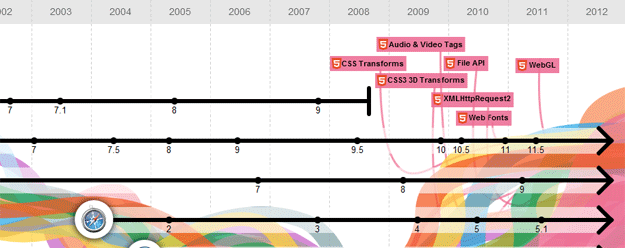
Do you remember using Netscape Navigator or Mosaic? What about constantly evolving web standards and other web technologies?
With the help of recently created web page, you can now relive those memories and dive into the ocean of oblivion.
Click here to do that now.
[Thanks, Ichann]
Weekly Browsers Recap, August 29th

- “Browser X is using Y MB of memory with Z tabs open” is a meaningless observation
- Mozilla WebAPI wants to replace native apps with HTML5
- Want a Faster Firefox? Pale Moon 6.0 Can Help
- Bing ad serves malware to would-be Google Chrome switchers
- Google Chrome Stable Channel Update
- Google Chrome Beta Channel Update
- Google Chrome Dev Channel Update
- Opera: Top Five Extensions
- Calling All Developers: Opera Developer Events
- 15 (More) Inspiring HTML5 Experiments
- Mozilla puts mobile Firefox on the front burner
[Thanks, Dirk Finken]
Weekly Browsers Recap, August 22nd
- Run Internet Explorer 10 using Internet Explorer 9′s UI
- How a Bing-Firefox Deal Could Change the Search Landscape
- Firefox 7 Beta Puts Priority on Performance
- Firefox 3.6.20 security update now available
- Google’s Chrome ‘Related’ Add-On: Handy, But…
- Google Chrome Beta Channel Update
- Google Chrome Dev Channel Update
- Beta Channel Update for Chromebooks
- Dev Channel Updates for Chromebooks
- Opera at Gamescom 2011
- Opera’s weekly build: Certificate Unbroken
Detect Which Browser Window/Tab Plays Music In The Background
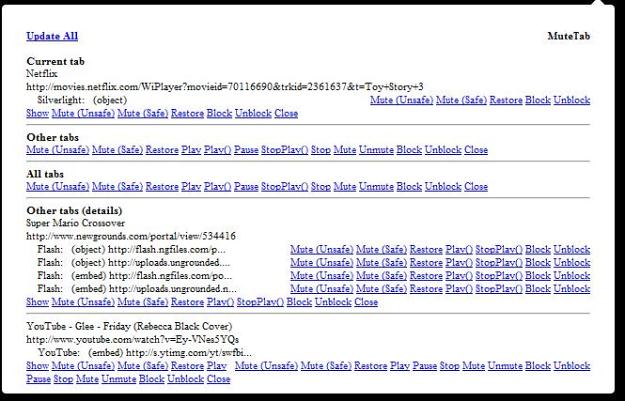
So you have a web browser open with dozens of tabs when suddenly you hear an annoying sound and have no idea which of the sites does that.
Don’t worry. MuteTab, a Google Chrome extension, is here to rescue. Not only it detects sound from tabs but also allows you to mute background tabs altogether.
Unfortunately, it’s not yet available in other web browsers. However, if you are a Google Chrome user, give it a try.
View Facebook Notifications Without Visiting Facebook

Here is a fun Speed Dial Extension for the Opera web browser: Facebook Preview.
Basically, it allows you to view Facebook notifications without opening the page. However, it still requires uses to use the “Keep me logged in” option.
Offering three different display modes to choose from, it will surely attract some of the social network addicts.
Via my.opera.com
Weekly Browsers Recap, August 15th
- Internet Explorer IQ Hoaxer Says He’ll Do It Again
- An infographic! If web browsers were wrestlers…
- Mozilla Brings The Sign In Button To The Browser Level
- Mozilla Wants a Browser to Control Your Phone
- How browsers make money, or why Google needs Firefox
- Building better web apps with a new Chrome Beta
- Dev Channel Updates for Chromebooks
- Google Chrome Dev Channel Update
- Google Chrome Beta Channel Update
- Google Chrome Beta and Stable Channel Update
- Opera goes to China with Oupeng browser launch
- Maxthon Mobile Selected as the Default Browser for GalnetMIUI
[Thanks, asknobody]
Web Browser Backup: FavBackup 2.1.1 Released
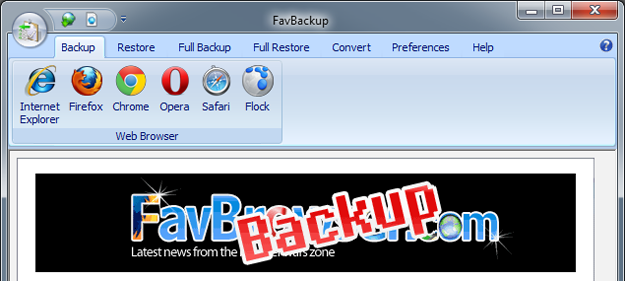
With the release of Firefox 6, we are happy to announced the availability of FavBackup 2.1.1, which fixes a bug when backing up AdBlock data (as reported by DeoDomuique) and adds a few new web browsers support.
Changelog
– Added Google Chrome 15 Dev Support
– Added Firefox 6 Support
– Fixed Firefox AdBlock Backup Issues
Weekly Browsers Recap, June 21st
- Microsoft Labels WebGL A Fundamental, Unacceptable Security Risk
- Dangerous WebGL Flaws Haunt Chrome and Firefox
- Google Chrome Stable, Beta Channel Updates
- Google Chrome Beta Channel Update
- Offline Google Docs starts playing peek-a-boo
- Google bypasses admin controls with latest Chrome IE
- Chrome OS Beta Channel Update
- Apple iPad Safari users must pay to read New York Post
- Opera Allows Bookmark Sync With Windows Phone 7
- Facebook Is Taking A Special Interest In RockMelt’s Social Browser
- Deep Shot transfers open websites from desktop to mobile, sans wizardry
- Windows SkyDrive Says Sayonara To Silverlight, Embraces HTML5
[Thanks, Ichan]
Google Chrome and Firefox Enhances Your Search Experience
Recently, Google has announced a couple of interesting new features for its search engine designed to enrich the overall experience.
The first one is called “Search by Image” which allows Google Chrome and Firefox (extension is required) users to search by using an image.
All you have to do is drag and drop the picture into the search box and that’s it, Google will figure out the rest (including location) and display somewhat relevant search results.
Continue Reading


