
Tag: Tips
Weekly Browsers Recap + Bonus Links, May 2nd
FavBrowser.com
Give Away: How to Create Web Browser Theme
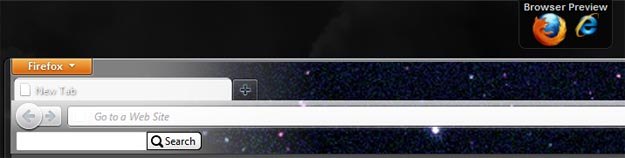
Today we are giving away 50 invites to BT Engage from Brand thunder, which allows you to make your own web browser theme.
Visit the following page
Click “Create an account”
Enter FavBrowser
Done.
Thanks to Mark for the give away!
Weekly Browsers Recap + Bonus Links, April 25th
FavBrowser.com
- Microsoft Starts Bug Warnings For Third Parties
- Mozilla Introduces New Channel Structure for Firefox
- Google Chrome Theme for Firefox 4
- Google Chrome Has 120 Million Users
- Chrome Called Out By FTC Over Do Not Track
- Opera: Disable Auto Image Fit to Screen / Pictures Resizing
- Safari to Receive Do Not Track Feature
- Maxthon Theme for Firefox 4
- Block Visitors That Block Ads?
Opera: Disable Auto Image Fit to Screen / Pictures Resizing
 If you are not a fan of an automatic image fit to the window that was introduced in Opera 11.10, then don’t worry, there is a way to turn it off.
Unfortunately, you can’t do that via Opera Preferences or opera:config. However, there is an extension to solve your problem.
– Install Image Autosizer extension.
– Menu (Alt) > Extensions > Manage Extensions.
– Find Image Autosizer and click on the gear icon > Preferences.
– Seek for the gray bar that is titled “Advanced” and click on it.
– View modes > When image is larger than window: Enable default and Original (see picture below).
– Save changes.
Continue Reading
Weekly Browsers Recap + Bonus Links, April 18th
FavBrowser.com
- Google Chrome Has 120 Million Users
- Opera 11.10 Final Bugs
- Mozilla and Opera Mock Microsofts Native HTML5 Claims
- Download Silverlight 5 Beta
- IE10 and Windows Vista? Forget It
- Dear Opera, How Do I Open This Tab?
- Firefox 5 Tweaks Tab Close and Auto Resize
- RockMelt Beta 2 Out Now
- Flock Is Dead
- Download Internet Explorer 10 Platform Preview 1
- Download Opera 11.10 Final
- Opera: Show Full Site Thumbnails (Old Speed Dial)
- Opera Turbocharges Opera Turbo
- Do You Like Us On Facebook Yet?
- Firefox 5 Supposedly Coming Out On the 21st of June
- The European Commission, Browser Choice, and Fair Play
Opera: Show Full Site Thumbnails (Old Speed Dial)
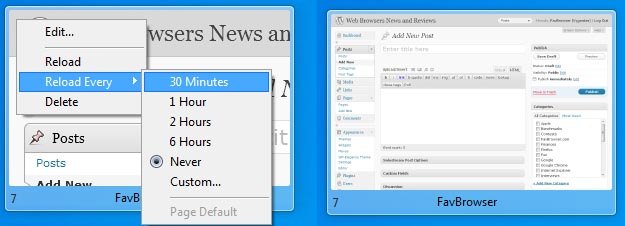
If you don’t like the way Opera 11.10 displays zoomed in site/logo thumbnails in the new Speed Dial, then here is how to fix this:
Right Click > Reload Every > 30 Minutes (or any other option)
Right Click > Reload
You will now notice that the full site thumbnails are back. However, if you don’t like the distraction by the constantly changing working environment, then click the following:
Right Click > Reload Every > Never
You now have static, full site thumbnails, just like in the older versions of Opera.
Weekly Browsers Recap + Bonus Links, April 11th
FavBrowser.com
- Internet Explorer 9 (IE9) vs. Firefox 4 vs. Google Chrome 10 vs. Opera 11 vs. Safari 5
- March, 2011: Firefox, Chrome, Safari Share Up; Internet Explorer – Down
- Mozilla Names Slow Extensions
- Google Chrome to Receive Scrolling Tabs
- Google Chrome to Improve Security
- Google Chrome Cookies
- The Story of Opera Employee
- Download Opera 11.10 RC
- CycleBlob: WebGL Lightcycle Game
- How Would You Change FavBrowser?
- FavBrowser.com v3 Launched
Weekly Browsers Recap + Bonus Links, April Fools Edition
FavBrowser.com
- The History of Web Browsers (Picture)
- IE9 vs. Firefox 4 vs. Google Chrome 10 vs. Opera 11 vs. Safari 5
- Internet Explorer 10: Microsoft Immersive Browser
- CrashIE.com Is a Scam
- IE9 to Firefox 4 Comparisons Are Misleading
- Best Video of 2011
- How Would You Change Safari?
- Opera: Remove/Hide Blue Dots
- Opera: Show Full Address Bar and Hide Web Button
- Why Opera Is My Default Web Browser
- Hate When This Happens (Picture)
- Typical April Fools Day
Opera: Remove/Hide Blue Dots
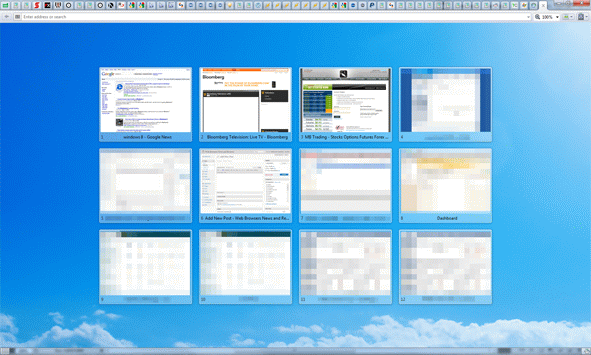
Here is how you can disable the blue dots in Opera
The easy way:
– Download this Opera 11 skin
– Place it to C:\Program Files (x86)\Opera\skin (or similar location)
– Restart Opera
– Click Shift+F12 (or go to Appearance…), select second Opera Standard Skin
– All set!
Continue Reading
Opera: Show Full Address Bar and Hide Web Button
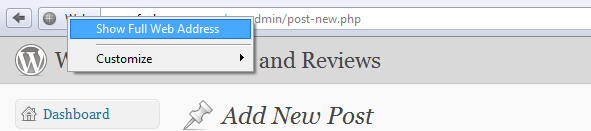
Now here is something what I have just discovered: turns out, you can “disable” the big Web button near the address bar.
All you have to do is right click on it and check “Show Full Web Address”.
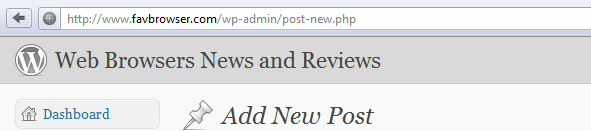
Job done.


