
Tag: Tips
Weekly Browsers Recap, July 5th

FavBrowser.com
• IE6 is “Safer” than Chrome or Opera
US Bank Chase has decided to stop supporting Opera and Chrome web browsers, implying security issues and low popularity.
• June, 2010 – Internet Explorer Gains Market Share; Firefox, Opera – Loses
As yet another month has passed by, it’s time to find out, how browsers market share has evolved over past 30 days.
Continue Reading
Weekly Browsers Recap, June 28th
FavBrowser.com
• Internet Explorer 9 vs. Google Chrome 6 (HTML5 Performance)
In rather pointless benchmark, DownloadSquad has tested latest Internet Explorer 9 build against Google Chrome 6 dev.
• Confidential Internet Explorer 9 Info
As from 4/14/2010 slides. Therefore, there are a lot of bits, that we know already.
Continue Reading
HTC HD2 “Unable to Initialize Camera” Error Fix
 Now, if you are receiving “Unable to initialize camera. Failed to set up the camera device” error on your HTC device (possibly any other Windows Mobile phone) and had no luck with soft reset, try the following:
Open task manager and make sure that Opera Mobile is not running, and close if it is. Now, I am not sure why it’s impossible to take pictures or record videos while you surf the net with Opera Mobile (as it makes very little sense), but here you have it, a quick and painless fix.
[digg-reddit-me]
Weekly Browsers Recap, June 14th
FavBrowser.com
• Internet Explorer 9 vs. Safari 5 (Hardware Acceleration)
With the recent Safari 5 announcement, Apple has also introduced hardware acceleration support for Windows machines.
• New Internet Explorer 8 Ad Campaign Begins
In effort to strengthen Internet Explorer 8 position in the market and raise people awareness, Microsoft has launched a new ad campaign. Continue Reading
Weekly Browsers Recap, May 17th
- Internet Explorer History Monitor
- Install Firefox add-on without restarting, now in nightly builds
- Mozilla Plugin Check for All Browsers
- The Book of Mozilla
- Use Google Chrome to Drag Images into e-mails
- Verizon’s Tablet Bet Is on Google Chrome
- Why the Opera web browser is anti-Flash
- Opera’s Secrets Unlocked: 16 Tips and Tricks
- Apple Safari Browser Hit By Zero-day Vulnerability
- iPad JavaScript Shockingly Slow?
- Is Your Browser HTML5 and CSS3 Ready?
- Android Browser Roundup
Thanks to Android, Ichann, Nox and Tiago Sá for links.
[digg-reddit-me]
Weekly Browsers Recap, May 10th
- Microsoft publishes its latest Security Intelligence Report, Vol. 8
- Worldwide Internet Explorer 6 Boycott? JavaScript Guru Says Do It!
- IE9 Platform Preview 2: more of the same, but a bit faster
- Firefox: How to Duplicate a Tab
- Mozilla to Detail Next Version of Firefox
- Updated Firefox 3.6.4 beta available for download and testing
- Google Buys BumpTop, A 3D User Interface For Chrome OS & Android?
- Opera Joins Flash Debate: “You Can Cook an Egg” While It’s Running
- How to change action for file types in Opera
- Unpatched drive-by download flaw in Apple Safari browser
- “Silent” update of Opera Mini 5
- FastMail.FM FAQ
Thanks to mabdul and RamaSubbu SK for links.
[digg-reddit-me]
How to Remove New Google Search Sidebar?
If you are not a big fan of new Google Search sidebar (which was introduced recently), here are few simple scripts for Firefox and Google Chrome users to remove it.
Google Classic
Remove Google Sidebar
In addition: feel free to try Hide Google options add-on as well.
Via SmarterWare.
[digg-reddit-me]
Weekly Browsers Recap, May 3rd
- Microsoft: HTML5 is the future of the web, will only support H.264
- Microsoft fires back at critics of its HTML5 strategy
- Firefox.next tab bar becomes customizable
- Detention Awarded for Using Foxfire.exe?
- Firefox for Android Pre-Alpha Released
- Hands-on: Mozilla’s foxy Fennec prerelease build for Android
- Mozilla Previews New Firefox Add-Ons Manager
- Google patches Chrome for second time this month
- Disable Google Chrome’s Location-Aware Browsing
- Features that Google Chrome offers that other browsers do not have
- Opera 10.53 released
- Design a new blog header for Choose Opera
- BlackBerry 6.0 Coming Soon With New Browser, Better UI
[digg-reddit-me]
How to Remove Opera O Menu Icon?
Here is a quick and painless way to disable/hide Opera menu icon:
Right click on Opera interface: Customize > Appearance > Toolbars
While Appearance window is still open, click on Opera Menu icon (it should highlight it)
Set toolbar placement to “Off”
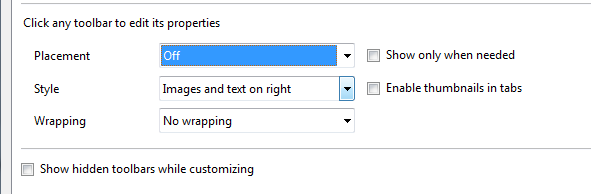
Job done.
Thanks to Daniel Hendrycks for this.
[digg-reddit-me]
Fix Opera and YouTube.com Issue
If you get “Old Flash? Go upgrade!” message in Opera, while trying to watch YouTube.com videos, try this solution:
Go to:
Help > Check for Updates
After you done that, new browser.js file will be loaded to your browser and shall fix this issue.
[digg-reddit-me]


