
Tag: Tips
Firefox, Opera, Safari: Grammar, Style, and Spell Checker
Now here is something useful for Firefox, Opera and Safari users. Unlike regular inline spell check, this tool will also seek for grammar and style mistakes.
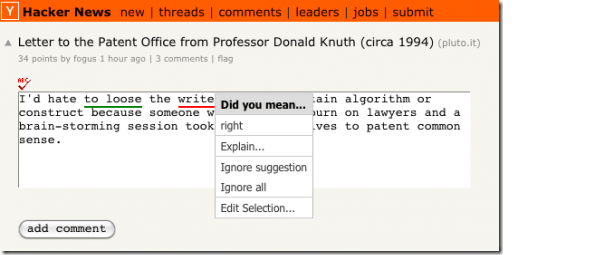
Picture Source: FirefoxFacts.
How to Install?
Add Proofreader <– drag this link to your browser’s link bar, or right-click and add as a bookmark.
How to Use
- Click the “Add Proofreader” link on your link bar to add a Proofread button above each text box.
- Click
 to find spelling mistakes, misused words, and grammar errors
 - Click
 to continue editing.
Visit tool home page.
[digg-reddit-me]
Tweak Internet Explorer with IE Tweaker
Now here is something for Internet Explorer users: IE Tweaker, a simple utility to fix and tweak IE web browser. As program author claims, it contains over 90 options to choose from.
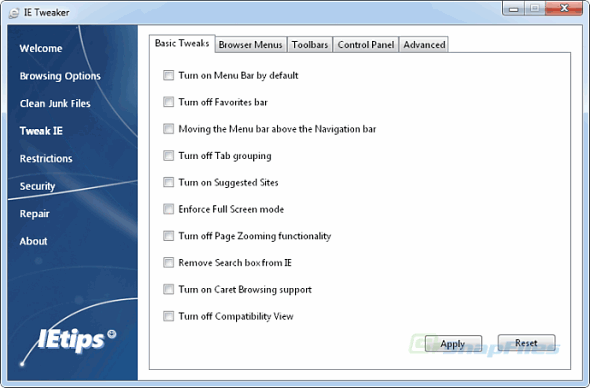
Now you can quickly delete all junk files, disable/enable various menus, clear type fonts, animations, smooth scrolling and much more.
Download IE Tweaker.zip (159 KB) or visit IE Tweaker home page.
[digg-reddit-me]
How to Remove Opera Small Blue Dots Near Tabs?
If you are annoyed by those white/blue dots appearing in your tab tab, then here is a solution on how to “disable” them:
1. Download the following skin (still pending Opera approval, so mirror is at FavBrowser.com).
2. Close Opera.
3. Place file to “C:\Program Files (x86)\Opera\skin”, “C:\Program Files\Opera\skin” or other location, where Opera is installed.
4. Open Opera and go to: Tools > Appearance… > Skin and select “Reloaded”.
5. Enjoy.
Before:

After:

[digg-reddit-me]
Get Best Product Price Offers in Firefox
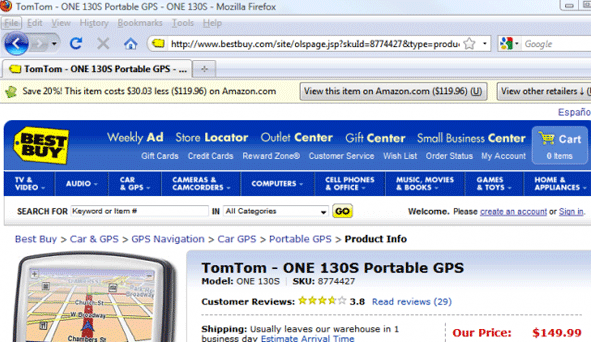
Here is a handful Firefox add-on for those, who buys online.
Once you install InvisibleHand extension, it automatically checks for better prices of the product, you are interested in (see screenshot).
Add-on authors claim that InvisibleHand currently supports over 100 of US, UK and German retailers.
[digg-reddit-me]
Google Chrome + Mouse Gestures = ChromePlus

Our reader Dainius has discovered a new tool/browser called “ChromePlus”. Basically, it’s a Google Chrome web browser with few additional features and without any Chrome background processes.
What additional features?
At this moment, it has the following:
Mouse gestures
Download Tools Support
IE tab
Super drag
Also, an ability to close tabs by double clicking on them.
Want to try it? Here is a home page link.
[digg-reddit-me]
How to Enable Firefox 3.6 Tab Preview?
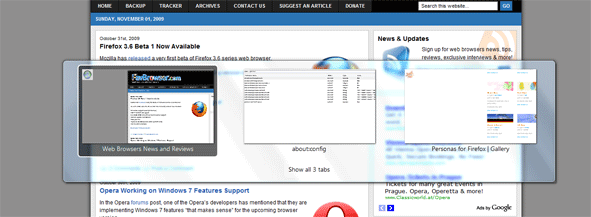
Here’s how you can enable tab preview in Firefox 3.6:
Type the following line into your address bar:
about:config

Look for:
browser.allTabs.previews
browser.ctrlTab.previews
Set both to true.
Use Ctrl + Tab to switch between tabs or Ctrl + Shift + Tab to get a list of opened ones.
[digg-reddit-me]
Boo! 10 Great Firefox Halloween Personas
As Halloween is slowly approaching, it’s about time to to enhance your Firefox looks. So, download Firefox Personas add-on and let’s get started.
Halloween (click on image to download)

Halloween bats

Continue Reading
How to Set Multiple Home Pages in Internet Explorer 8, 7, 6
Here is a quick and easy way to set multiple home pages in Internet Explorer 8 and below. All you have to do is:
Go to
Tools –> Internet Options –> General Tab
Enter your favorite pages and hit OK.
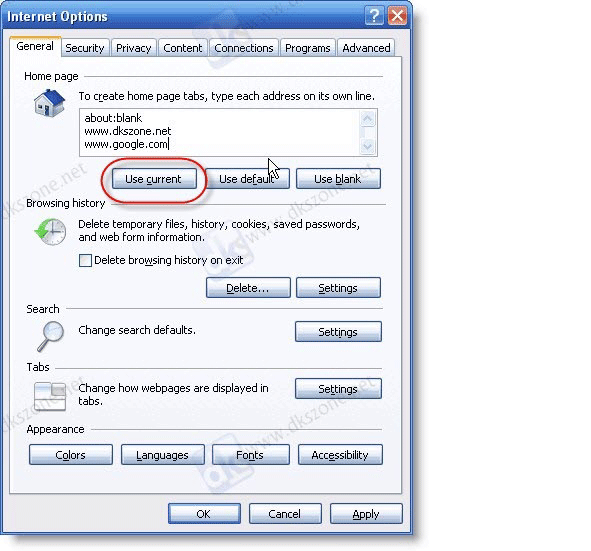
You may also use “Use current” button, which will add URLs from your opened tabs.
[digg-reddit-me]
Creating Google Chrome Theme with Your Pictures
 Mr. Kamalakar has written a short guide on how to create a simple Google Chrome theme with your own images.
All you have to do is: paste code into your theme manifest.json file, copy some pictures and that’s about it.
[digg-reddit-me]


