
Tag: Tips
Weekly Browsers Recap, March 23rd

- Microsoft Winning Fans Early with Internet Explorer 9 Preview
- Windows Phone 7 browser is based on Internet Explorer 7
- IE8, iPhone will fall first day of hacking contest, predicts organizer
- Firefox 3.0 reaching end of the line
- Clear Firefox’s History for a Single Site
- Chrome Tip: Always restoring tabs
- Google Launches 3D Graphics Driver Project for Chrome
- Opera expands widget offering to all mobile phones
- Opera’s AdMarvel Partners With PointRoll For iPad Advertising Platform
- Analyst Uncovers 20 Security-related Flaws in Safari
- Amazon’s Kindle may get a proper web browser
- Next-gen Web TV apps focus on the browser
- Camino 1.6.11 Released
Thanks to Daniel Hendrycks for links.
[digg-reddit-me]
Weekly Browsers Recap, March 15th
- Microsoft to Double Down on HTML5 With Internet Explorer 9
- That wasn’t supposed to happen: IE usage share steady since choice screen
- Exploit for new IE hole
- Microsoft seeks browser comeback with IE 9
- Study lauds IE for blocking Web’s social attacks
- What enterprise still uses IE 6? Try Intel
- Presenting: Direct2D Hardware Acceleration In Firefox Nightlies
- Firefox previews new feature to protect against Flash crashes
- 10 Firefox Add-ons to Beautify Your Browser
- Firefox may never hit 25 percent market share
- Google Chrome Rolls Out Translate Feature
- Google to strip unique client ID from future Google Chrome installs
- World Bank designs game to be compatible with Opera Mini
- Opera says bug probably can’t commandeer machines
- Opera Takes the First Spot in Google’s JavaScript Compliance Tests
- Opera Mini 5 solves some of Android’s native browser problems
- Opera Mini 5 Beta Announced as Native WinMo App
- Apple rushes out Safari patch. Hoping not to lose Pwn2Own contest
- Flash Player: CPU Hog or Hot Tamale? It Depends
- Cross Browser CSS Transforms – even in IE
- Does Your Browser Behave?
Thanks to Daniel Hendrycks, Dels, mabdul, nobody and Nox for links.
[digg-reddit-me]
Weekly Browsers Recap, March 1st
- IE tag – Take Two
- Documenting Standards in IE
- Microsoft investigating new Internet Explorer vulnerability in Windows XP
- Microsoft plays dirty against other browsers in Russia
- Firefox Mobile Browser Fennec Spotted on Android
- External Text Editing in Firefox
- The Downfall of Personas
- Coming Soon To Chrome: Extensions That Can Alter Your Browsing History
- Google Chrome Tip: Recovering closed tabs
- Zero-days flaws surface in Apple Safari
- Opera Mini Server Upgrade to 4.16.916
- Browser history hijack + social networks = lost anonymity
- Camino 2.0.2 Released
Thanks to mabdul and Nox for links.
[digg-reddit-me]
Open Firefox 3.6 Tabs in Far Right
 Instead of opening new tabs in far right (right after the last tab), Firefox 3.6 uses bit different approach, which might not be appreciated by some of the users.
If you would like to change this behavior, here is a quick to follow tutorial:
Enter about:config in the address bar
Find tabs.insertRelatedAfterCurrent
Right-click on it and select “Toggle”
That’s it. Enjoy.
[digg-reddit-me]
Google Chrome: Installer Does Not Open?
Got any setup issues? If Google Chrome installer does not work for you (nothing happens, when opening it), there might be nothing wrong with it.
In fact, if you already have Chrome installed and trying to upgrade it, installation might run silently.
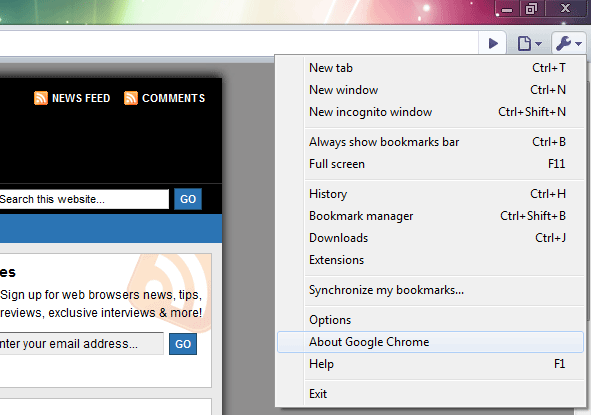
After you have “launched” setup, just open “About Google Chrome” and see version number. It’s highly possible, that you are already running your preferred release.
[digg-reddit-me]
Firefox: Hide Menu, Navigation Bar, Tabs, Bookmarks and Statusbar
Here is one more tip/extension for Firefox users. With simple add-on “Hide GUI Bars” you can hide various GUI elements, such as: menu, navigation bar, tabs, bookmarks and statusbar using toggle keys (CTRL+Shift+A).
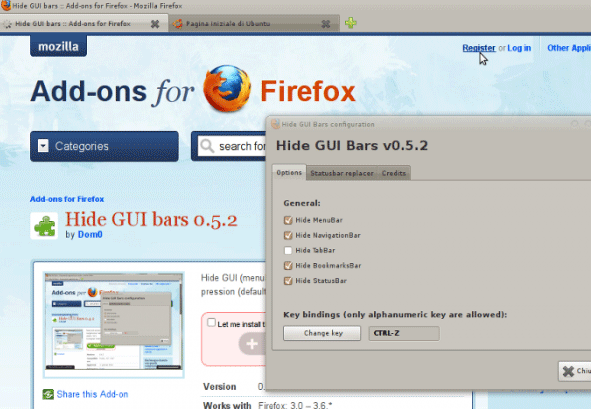
Via FirefoxFacts.
[digg-reddit-me]
How to Disable CTRL+Q (and other Hotkeys) in Firefox, Thunderbird
 Ever accidentally pressed CTRL+Q or any other hot key, when you didn’t really need that? Fortunately, extension called “keyconfig” will help you on this.
Not only you can change and disable hotkeys for Firefox and Thunderbird, but also: Sunbird, Flock, ChatZilla on XULRunner, Prism, Songbird, McCoy, SeaMonkey 2.0, etc.
keyconfig adds the ability to create new or modify existing shortcuts defined by a element, but only changing those which itself call a function (those with a command or oncommand attribute) has an effect (all others fulfill only cosmetic purposes it seems and are grayed out).
After it’s installed, just hit Ctrl+Shift+F12 (Tools > Keyconfig), find CTRL+Q and click on “Disable” button. That’s it.
[digg-reddit-me]
Opera 10.50: Disable UI Animations (Slide/Fade in Effects)
If you are kind of person who does not like tabs and forms slide in/out, fade in/out animations, here is a quick way to disable them.
In the address bar type:
opera:config#UserPrefs|EnableUIAnimations
Uncheck “Enable UI Animations”
Save settings and you’re done.
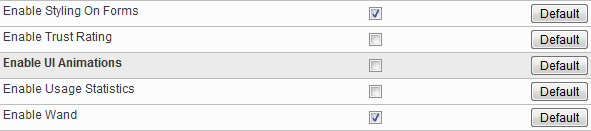
[digg-reddit-me]
How to Backup Opera Mobile 10 Bookmarks?
If, for one reason or another, you don’t use Opera Link, here is a simple way on how you can backup your Opera Mobile 10 bookmarks (Windows phones).
Go to:
Program Files\Opera Mobile 10\profile\datastorage\2\
or
Windows\profile\datastorage\2\
Search for all.dat file and copy it into a safe place.
[digg-reddit-me]
Opera: Undo “Stop Executing Scripts on This Page”
Ever checked “Stop Executing Scripts on This Page” box and don’t know how to undo this action?
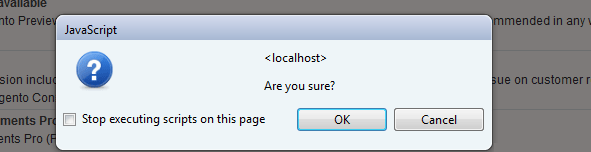
The following setting lasts for that session/tab only. Just close your tab and re-open it. Simple.
[digg-reddit-me]


