
Archive for August, 2007
Firefox 3 Pre-Alpha 8 – New Nightly Build (28 Aug 2007)
 It’s been just a few hours since I’ve posted about “Firefox 3 Pre-Alpha 8 – New Nightly Build (27 Aug 2007)”. I have more good news about Firefox 3 Pre-Alpha 8. 28 Aug 2007 build was just released. This nightly build fixes even more bugs than the previous one. Here’s what has been fixed:
And just a reminder: This is NOT a final version. It contains bugs, use it on your own risk.
Like this post? Subscribe to our RSS Feed.
Firefox 3 Pre-Alpha 8 – New Nightly Build (27 Aug 2007)
Don’t you just love to install new web browsers builds? Yes, you do. Firefox team yesterday released their new Firefox 3 series build. It’s Firefox 3 Pre-Alpha 8, 20070828 (Trunk). So what does this new build brings? It’s alpha, so basically bug fixes, many of them were fixed. Here’s a full changelog:
Fixed:
Partial Landings/WIPs/Incoming:
Regressions/Annoying/Common bugs:
This is NOT a final build. Use it on your own risk.
Like this post? Subscribe to our RSS Feed.
Web Browsers Finances – Opera Software 2007 Q2 Results
 Good afternoon everyone. Few months ago I’ve started to monitor web browsers market share growth. Today I am thinking about something new again.
Oh yes, we all love graphs and various numbers (I love them). So since we are monitoring browsers market share already, what else can we monitor? Finances.
Opera Software today released their “Second Quarter 2007 Report” which includes some very interesting information. Here are some pictures (had to modify them a bit to make them fit in this blog).
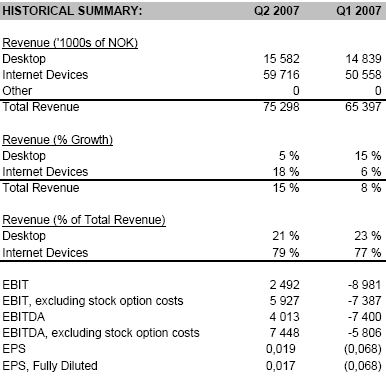
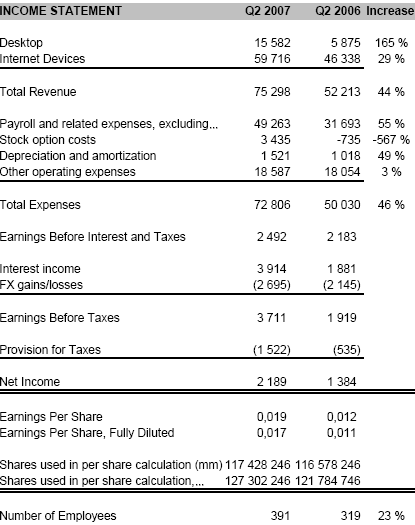
As you can see Opera Software managed to increase almost everything (expect stock options costs), from revenues to employees.
Here are some more interesting information:
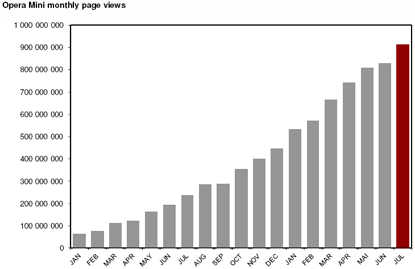
Soon to hit one billion per month. Congratulations to Opera Mini team.
Opera Software also provided their goals in 2007. Here are they:
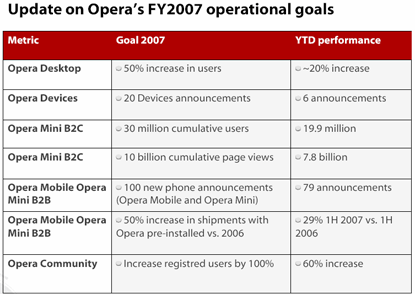
Note: This does NOT constitute financial guidance.
Do you think they can complete all of them?
The only thing which made me wonder a bit was their “Working with global leaders” page.
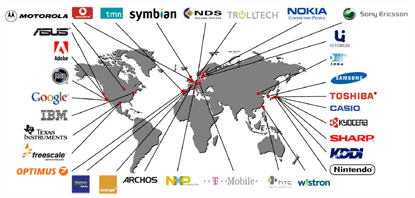
Don’t you miss anything?

I went to their partners page and haven’t found “Yahoo!” there as well. Aren’t they in some kind of partnership? Have they just forgot to add this web giant?
Like this post? Subscribe to our RSS Feed.
Opera 9.5 – More Details Revealed
There was some (one?) complain(s) in the “No Opera 9.5 or Opera Mini 4 Beta 2 or Final Today” post that Opera team haven’t posted anything in THEIR blog. So here you go, they did it on Saturday evening.
Whole post tells about Opera 9.5 developing, there are still many issues which needs to be fixed before releasing first public build and as Junyor (Tim Altman) said: “We have strict quality standards that have not yet been met”. That explains everything.
New Features
Opera always hides most important features which will be available in their next browser release, whether it’s Opera for desktop, Opera for mobile phone or any other one. I really like that. It makes you excite about something what you don’t know and when only a day or two are being left before release, they start to tease you even more. Thank you for that.
OK, new features/fixes. So not many was revealed, but here are the few:
An ability to manually update newsfeeds, just press F5 and you are done (I hope they will add some kind of button in the interface too).
Remember when you’ve clicked View > Encoding menu and it didn’t do anything for messages? Fixed.
That’s all. Let’s wait.
Like this post? Subscribe to our RSS Feed.
Firefox Campus Edition
Recently Firefox released their Firefox web browser Campus Edition and as they say:
Firefox Campus Edition combines the Speed, Security and features of the Firefox browser with Special extras that give you Streamlined access to music, cool sites and useful information.

With Firefox Campus Edition you can do some cool stuff which includes: music listening while you are surfing (FoxyTunes), facts managing (Zoter) and new sites search/discovering (StumbeUpon).
What is Firefox Campus Edition?
Firefox Campus Edition combines the Firefox web browser with special extras that give you streamlined access to music, cool sites and useful research tools. It’s a way to get the most out of the web that’s been created just for students. And it’s free!
What extras are included?
FoxyTunes lets you control almost any media player and find lyrics, covers, videos, bios and much more with a click right from your browser.StumbleUpon lets you channel surf the Internet to find great websites, videos, photos and more based on your interests.
Zotero helps you collect, manage, and cite your research sources. It lives right where you do your work – in the web browser itself.
Like this post? Subscribe to our RSS Feed.
FavBrowser.com v2
 Now you’ll probably think: Oh no, one more topic about FavBrowser.com. Why don’t you guys post about web browsers anymore?
I have some information so would like to share with everyone of you.
First of all, thanks to everyone who is spreading word, linking to FavBrowser.com from their sites and just reading this blog. Thank You.
This week I was playing a bit with the logo but that’s not enough, right? I am thinking about more changes. So here are some of them:
- New web design. I will try to make it look bit more like a portal. Not really sure when I will finish it. But I don’t want to design this web page just for myself, so if you have any suggestions, please let me know them.
- More news. From now I will be posting not just about big guys like Internet Explorer, Firefox, Safari or Opera.
- Different posts style. I was just writing about new web browsers releases, included change log and that’s all. I will try to give those posts more “pashion” so every web browser fan would enjoy reading it much more.
Also some minor changes (added already) like e-mail subscriptions and “Hot Topics”.
Want anything else? Feel free to offer.
No Opera 9.5 or Opera Mini 4 Beta 2 or Final Today
I was just thinking to write about that and noticed that Junyor from Opera already said: “No weekly of Kestrel today.”.
There is one reason for that (which now I understand). Opera Mini 4 Beta wasn’t released on Friday as it’s bad day for such releases. So we will get new build on Tuesday or Wednesday (no idea which week) as Opera wants to get as many attention as possible and Friday is not good for that. Don’t expect Opera 9.5 or Opera Mini 4 Beta 2 or Final today.
Like this post? Subscribe to our RSS Feed.
Pingdom Gives Away $120 000 In Free Accounts
Mr. Uptime Firefox plug-in is celebrating it’s 1 year anniversary, congratulations. For this reason Pingdom.com is giving away $120 000 in free accounts (1000 accounts total worth $120 each) so hurry up if you are interested. For Firefox users only, nice promo.
Why Pingdom?
Your website was probably down last month. Email servers, FTP servers, firewalls, and a multitude of other services can also perform poorly or even stop responding entirely.
The question is, are you aware of it? Do you know when it happens? Do you know for how long? This is where Pingdom comes in.
We can monitor all aspects of your website and other infrastructure for you and instantly let you know when anything goes wrong. Not only that, Pingdom will also collect a great deal valuable and useful statistics for you.
Q: Why do I need Mr Uptime?
A: On a daily basis millions of Internet users encounter websites that don’t work as intended. In most cases you as a user just want to visit a website to get information but can’t because of various kinds of issues. It could be a problem on your end, with the website, or somewhere in between. Mr Uptime will help you by informing you when the website is working correctly for you again.
Which One Do You Like More?
Please take a few seconds and tell me: Which one do you like more? With or without the slogan?
With:
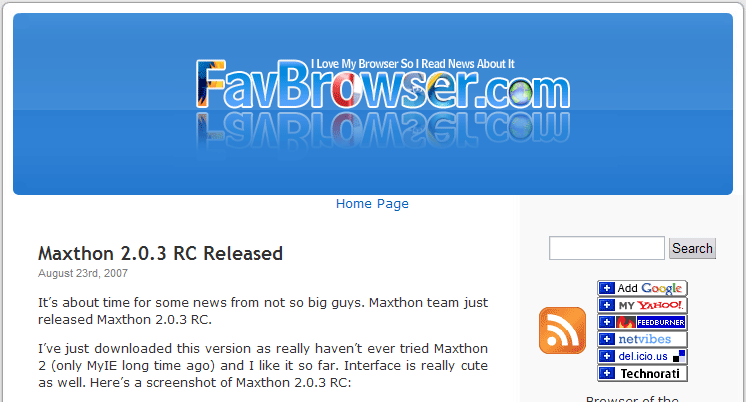
Click to enlarge.
Without:
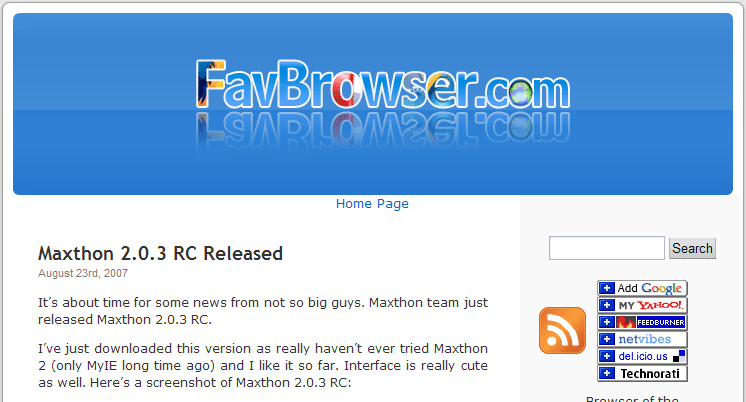
Click to enlarge.
Thank You.
Maxthon 2.0.3 RC Released
It’s about time for some news from not so big guys. Maxthon team just released Maxthon 2.0.3 RC.
I’ve just downloaded this version as really haven’t ever tried Maxthon 2 (only MyIE long time ago) and I like it so far. Interface is really cute as well. Here’s a screenshot of Maxthon 2.0.3 RC:
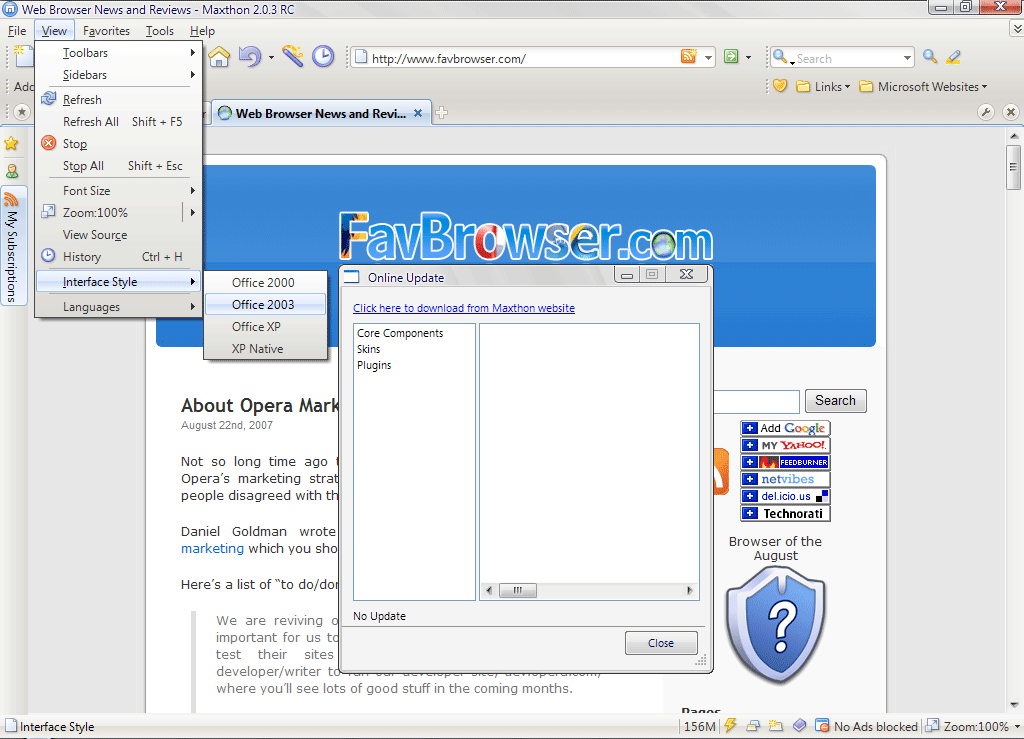
Click to enlarge.
This new build includes lots of bug fixes as well as some new features. Here’s a complete list of changes:
- New Security Guardian
- New Screen Capture
- Sniffer bug for wma file format
- Active tab for undo and URL Key
- Super Drag&Drop may use external download mananger
- Scrollbar can be clicked in block page content mode
- Drawing bug in Security Guardian dialog
- Added Clean Feed History and Search History in Clean Browser History
- Use Enter key to open the Favorites item wich has the focus
- Close Resume List tab when all links in Resume List are clicked (The “Auto Close” option must be checked)
- Delete Search History in History page
- Enter in Address Bar will not open new tab if the url hasn’t changed
- Added site range selection in Block Page Content
- Click on Links will have no effect while in Block Page Content mode
- Automatically upload modified Favorites when exit
- Re-organized Right-click menu on Favorites
- Resume List lost when program crash
- Super Drag&Drop can not download file problem on some websites
- Several issues that might cause crash
- Blank images not remove with Ad Hunter
- Issues that prevent set Maxthon as default browser (including issues on Windows Vista)
- Referer error with Flashget while multi-thread tab is on
- Not show start page when opened by external call
- Improved download method of Favicons
- File Sniffer won’t sniff WMA format
- Issues that occur with invalid file format settings
- Issues that affect website filtre range
- “Dont’ remind me for 1 week” won’t work in Update Notification dialog
- Crash when delete blank website item in Content Filter black list.
- “Check Links” in Favorites sidebar might cause all links in sidebar disappear
- Initialization failure when start Maxthon with invalid URLs
- Click Cancel in Screen Capture Options might cause capture page fail
- Clean Profile Data flaw in Login dialog
- Can not select buttons in Add/Remove Button menu on Single-line Favorites Bar, and Hot Items’ name is aa
- Press Esc key in Ad Hunter > Edit Filter List dialog causes dialog turns gray
- Redirect in current page might cause Address Bar refresh
- Strange behavior of the Close button of Check Updates dialog
- Resize Check Updates dialog cause strange lines
- Maximum Open Tabs number is not correct
- Favicons display problem in several circumstance
- Display problem after selecting search engine
- Delete selected Proxy might cause display error on Proxy status
- Edit Content Filter Black List & White list will only save displayed one
- Repeat “Capture Current Page” might cause file name error
- Clean Browser History in Safety Menu can not clean Feed history
- Issues when operate Favorites bar with keyboard
- Fixed a bug when overwrite Favorites
- Super Drag&Drop might cause Open Favorites Items in Background fail when Activate New Tab is checked
- Combobox is not resizable in “Lock Toolbar” mode
- Can not use Ctrl+Arraw to change tabs
- Resume List not saved at crash
This is not a final version. Use it on your own risk.


