
Tag: Windows
Opera: 100 000 000 Mobile Users

Updates are coming.
Opera Software has just announced that more than 100 000 000 mobile users now use Opera web browser on their cell phones.
That’s not all! In the official Choose Opera blog post, it was revealed that all Opera Mini and Opera Mobile versions will receive updates later this year.
Yes, even Symbian or Windows Mobile builds.
Can’t wait.
SurfCube: 3D Browser on Your Windows Phone 7
Makes 2D UI look obsolete.
Here comes another IE Mobile based web browser for Windows Phone 7 platform.
However, this time it’s all about 3D. By using “cube design”, it allows users to switch between different sides of it and navigate in such fashion.
Furthermore, it supports landscape mode, orientation lock, private browsing mode, accelerometer and even got bandwidth saved.
Interested in? It can be yours for $1.99 and downloaded from Windows Marketplace.
Private Browsing Mode, Tabbed Browsing for Windows Phone 7 IE
Well, that did not take long.
Yesterday, a new app called Browser+ ($0.99) was included into the Windows Phone marketplace.
Basically, it’s a modified Internet Explorer Mobile shell with the enhanced functionality:
Tabbed browsing
Private (incognito) mode
On the downside, it does not yet support landscape mode.
Via: WPCentral
Windows Phone 7 Browser Comparison
Guys at PocketNow.com compared Windows Phone 7, iPhone and Android browsing experience.
[digg-reddit-me]
An Interview with Mozilla’s Christopher Blizzard
 Gizmodo has sat down with Christopher Blizzard, Mozilla’s Director of Developer Relations to discuss the future of Firefox it’s competitors and browsers in general.
Furthermore, he confirmed that company is not going to develop Firefox for Windows Mobile/Phone 7 anytime soon.
Read.
[digg-reddit-me]
Firefox 3.7 Receives Windows 7 Jumplist Support
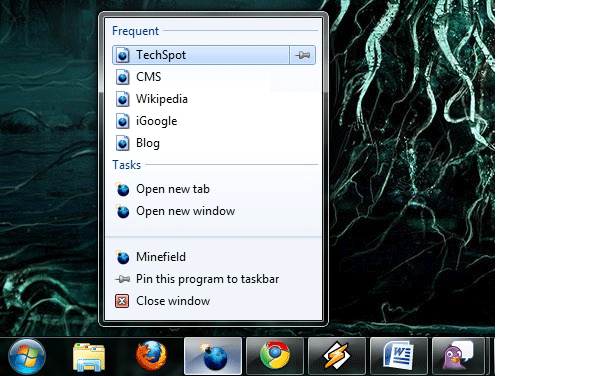
Picture source: TechSpot
With the upcoming Windows 7 release, developers are working hard to take an advantage of new OS features such as jumplist. Some time ago, Google has implemented the following feature into its Chrome web browser, and now, the latest Firefox build on Mozilla’s Tryserver includes Windows 7 Jumplist support as well.
As you can see from the screenshot, users will be able to quickly access their most frequent visited web pages and open new tab and/or window easily.
Try Firefox 3.7 with Jumplist Support.
[digg-reddit-me]
Chrome 3 Performance: Windows XP vs. Windows 7
BetaNews has recently made an interesting discovery (Is Google optimizing Chrome 3 for Windows XP netbooks?). As you might guess from the title, they suspect that Google is optimizing Chrome 3 for Windows XP and not for Windows 7.
Using the most recent v3 release (3.0.193.1), they have published quite strange results. Turns out, XP has gained more than half a point over 3.0.192.1 while same build in Windows 7 RC received a performance loss.
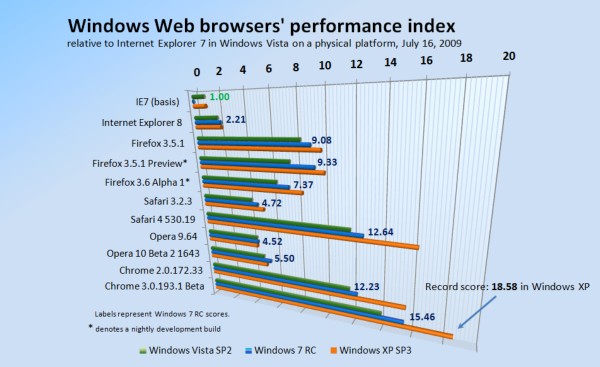
Higher is better
For some more details and reasons behind that, you might want to check the original article.
Thanks to Help for sending this.
How to Remove/Disable Opera Systray Icon
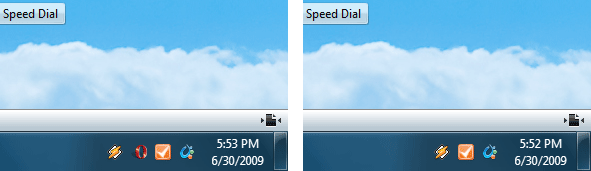
If you love clean working environments, then this is a must use tip for every Opera user. Ever got annoyed by system tray icon? Want to remove it? It’s easier than you thought.
Windows
Right click on Opera shortcut > Properties
Find target fields which should look similar to this:
Target: “C:\Program Files (x86)\Opera\opera.exe”
Replace with: “C:\Program Files (x86)\Opera\opera.exe” /notrayicon (with quotes).
Linux
Find your launcher and edit it by adding -notrayicon in the end.
opera %u -notrayicon
Update: there is an option in opera:config now, check this post for more details.
Windows 7 Raises New Antitrust Complaints, Report Says
Microsoft’s Windows 7 operating system is already drawing complaints from rivals that the OS gives the company’s Internet Explorer browser an unfair advantage. Mozilla and Opera have raised new concerns about Windows 7.
[Read]
Windows 7 RC Improves Internet Explorer 8 Experience
With the recent Windows 7 RC Release, Internet Explorer 8 received a pleasant improvement to its reliability on Win 7.
Basically, when one of the IE8 tabs crashes/hangs, user gets a choice on what to do with it (see screenshot). Continue Reading


