
Tag: Dragonfly
Opera Hints At The Google Chrome Like Release Cycle
 In order to calm down some of the most dedicated fans out there, Adam Minchinton, Opera developer for Mac, has issued a statement, claiming that there is a lot more to come and yes, they made a list of features that you demanded. Unfortunately, it was not shared publicly.
As far as release cycles go, gone are Beta and Alpha builds, instead we will get a yet another naming scheme just for the sake of it. I mean, why would you use clear and well known descriptions when you can make up random names like Aurora, Dev, Nightly, Next, you name it.
This is what we will get:
Continue Reading
Opera Dragonfly 1.1 Released, Core Developer Leaves Opera
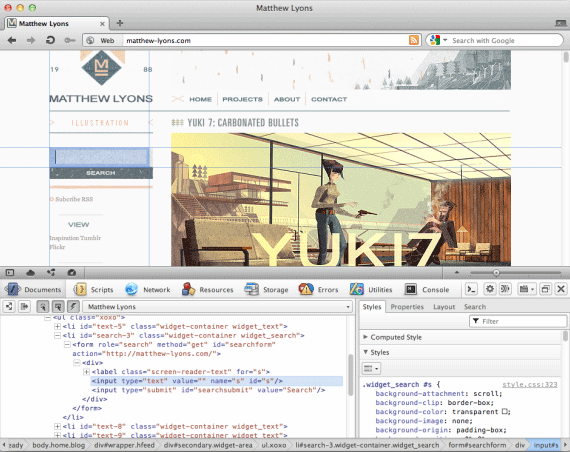
It seems that Dragonfly is not yet dead. 4 months after releasing the initial stable build of Opera Dragonfly, it has now been updated to the version 1.1.
In the official post, David Storey wrote, “around 3 and a half months ago we launched version 1.0”, which is not actually true as Opera Dragonfly 1.0 was releases on May 4th and that was 4 months ago. While that’s nitpicking, it looks like even its developers are ashamed of the release cycle train wreck that Opera Dragonfly had.
Furthermore, David Storey, a guy who is responsible for the Opera Dragonfly development, has announced that he will be leaving the company, right after 1.1 release.
For all the new features and changes, see the original post.
[Thanks, MarkG, Mikah]
Opera Dragonfly 1.0 Released
Good news, the very first stable build of Opera Dragonfly has been just released and can be tested on your Opera web browser (desktop, mobile or even TV).
Just hit CTRL+Shift+I if you running Windows or Linux machine and ⌘ + ⌥ + if you are on Mac.
Opera Dragonfly offers a variety of features, including:
Continue Reading
How to Enable New Opera Dragonfly UI?
 Would you like to test a new Opera Dragonfly UI? Here is how:
1. Type opera:config#DeveloperTools|DeveloperToolsURL in the address bar.
2. Change “Developer Tools URL” path to https://dragonfly.opera.com/app/stp-1/experimental/
3. Click Save (restart not required).
Thanks to “narzędzia warsztatowe” for the tip.
Via my.opera.com
Opera Refreshes Opera Dragonfly UI
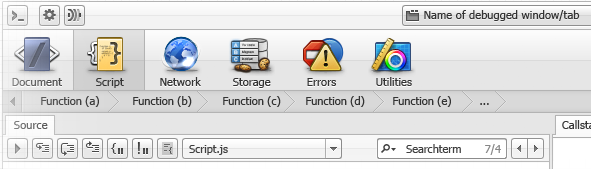
David Storey from Opera Software has just announced the upcoming and much needed visual refresh for Opera’s Dragonfly.
While estimated time of release remains unknown, it’s good to see that company has not forgotten its debugging tools.
Could this bring Opera back into the game? Potentially yes, if it’s much more than just a new UI.
For more details and screenshots, visit the the following page.
Internet Explorer Developer Tools vs. Firefox Firebug vs. Safari Web Inspector vs. Opera Dragonfly
The time has come to compare most popular web browsers developer tools: Internet Explorer 8 Developer Tools, Firefox Firebug (1.4), Safari Web Inspector (r46183) which is similar to Google Chrome Developer Tools and Opera Dragonfly (Alpha 3).
About
Those are default installed web browsers/extensions with no settings changed. This is a mini comparison which focuses on elements inspection, source modification and overall usage rather than advanced tools. If you find yourself using features such as script debugging, elements loading speed, etc. this review might not be very helpful.
Continue Reading
How to Turn Off Opera Dragonfly?
I would like to give a small tip to Opera team. Please, add a feature to turn off developer tools by using “X” button in the right corner. I actually haven’t figured out yet how turn it off. Though remember that somehow I managed to do that in old builds.
Screenshot below: Continue Reading
Opera Dragonfly. The Next Big Thing?
David Storey from Opera team recently blogged about something called “Opera Dragonfly”. While no one knows what it is, Opera team keeps teasing everyone (like they always do). Here’s a quote from David Storey blog post:
So what exactly is Opera Dragonfly? I won’t say quite yet, but I do think that, in my opinion, it is the most important project we have on going at the moment, and probably since I’ve been at the company. It won’t directly affect everybody, but will hopefully become invaluable for those that it does. We’ll likely have more to say about it at SxSW in Austin Texas.


