
Tag: Chrome
Web Inspector, Now with CSS Tracking
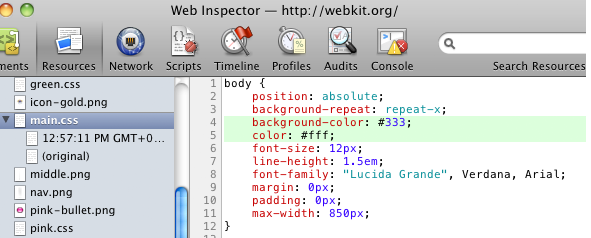
Good news, the team behind Web Inspector has pushed a new version that improves CSS editing capabilities.
What’s new?
The Web Inspector will now show all the declared properties, even the ones that are not understood by a web browser.
Color property values can now be shown exactly as they written in an inline style.
It now uses two separate fields for property name and value.
And best of them all: the history of style sheet. This means that you can now track all the CSS changes that were made during editing.
Overall, it’s a nice update and we hope to see CSS tracking implemented into other dev tools as well.
For even more details, visit the original post.
CTRL+F in Google Chrome Is Awesome
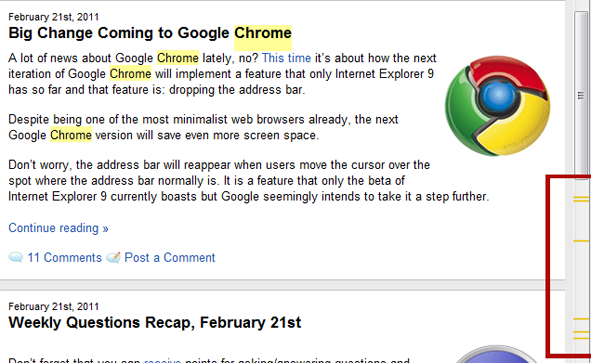
Although I find myself using find function quite often, I haven’t noticed this Google Chrome feature before:
It shows in the scroll bar where the word you’re searching for is located.
Via: Reddit
Big Change Coming to Google Chrome
 A lot of news about Google Chrome lately, no? This time it’s about how the next iteration of Google Chrome will implement a feature that only Internet Explorer 9 has so far and that feature is: dropping the address bar.
Despite being one of the most minimalist web browsers already, the next Google Chrome version will save even more screen space.
Don’t worry, the address bar will reappear when users move the cursor over the spot where the address bar normally is. It is a feature that only the beta of Internet Explorer 9 currently boasts but Google seemingly intends to take it a step further.
Continue Reading
Weekly Questions Recap, February 21st

Don’t forget that you can receive points for asking/answering questions and redeem them for cool prizes.
Unresolved
- Web-browser battle: which are you using and why?
- Suggest some skin/theme for firefox, opera, chrome?
- Why does Opera fail to grab a good per cent of user base like IE/Firefox/Chrome?
- What was the first browser you ever used?
- Help to Disable Panel While Checking Feeds?
Answered
Taking a Look at the New Google Chrome 10 Beta
Google released the newest Google Chrome 10 build to the beta channel yesterday, boasting progress in the form of revamped browser settings, password sync features, as well as JavaScript performance.
V8, Chrome’s JavaScript engine, now runs intense JavaScript applications faster than in the past. To be more specific, the V8 benchmark suite indicated an improvement over the current stable release of 66%. See the chart below to see how it compares with prior versions of Chrome.
Continue Reading
Majority Of Web Browsers Are Unpatched
 Wolfgang Kandek, CTO of security risk and compliance management provider Qualys, revealed that approximately 80% of web browsers are susceptible to exploits of bugs that have already been patched. Kandek attributed this mostly to Windows, saying “All the different patching mechanisms are confusing, a bit of this and some of that.”
As discovered by BrowserCheck (which scans Windows, Mac and Linux machines for vulnerable browsers along with browser plug-ins), Oracle’s Java was the most probable plug-in to be outdated for the second year in a row, comprising a total of 40% scanned systems. Adobe’s Reader and Apple’s QuickTime were second and third, taking up 32% and 25% respectively.
Proposed solutions include:
- Microsoft taking charge of patching crucial third party plug-ins via single updater.
- Moving to HTML5, so browsers would no longer require various audio and video processing plug-ins.
Firefox Borrows Google’s Chrome Update Procedure
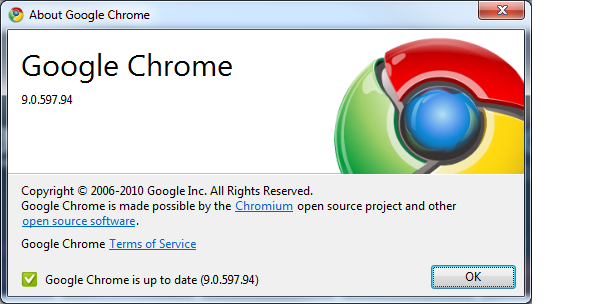
If you’ve been using Google Chrome for a long time, then it’s pretty clear to you that to check for updates, all you have to do is go to:
About Google Chrome
CSS Checkbox Styling Nightmare (Pic)
It looks like a simple checkbox is one of the hardest things to style (unless you use JS).
Continue Reading
Fix Different Color in Internet Explorer (IE), Firefox, Chrome Issue
 If you see a color difference in Internet Explorer (when compared to other browsers, such as: Firefox, Google Chrome, Safari, Opera, etc.), then here your reason:
In case those are PNG images, Adobe Photoshop stores gamma data inside them which is causing image colors to differ in IE7.
How to solve it?
Download PngCrush, PNGOut or similar tools and optimize images.
Google Chrome: How to Enable/Disable Google Instant
Here is a quick and painless to turn on Google Instant in your Chrome web browser.
Click on the Preferences (wrench) icon.
Go to Options > Basics
In the “Search” section, check “Enable Instant for faster searching and browsing” checkbox and hit “Close”.
All set.


