
MSN (Windows Live) Chat in Opera
 One of the my.opera.com users has written a tutorial that enables you to chat with your MSN contacts using a built-in Opera IRC client.
1. Go to Tools > Mail and Chat Accounts
2. Pick Chat (IRC)
3. Enter account details (use your Windows Live email)
4. When asked for server name, enter: im.sixxs.net
5. You should now see a tab called “&bitlbee”. Select it and type: register yourpassword
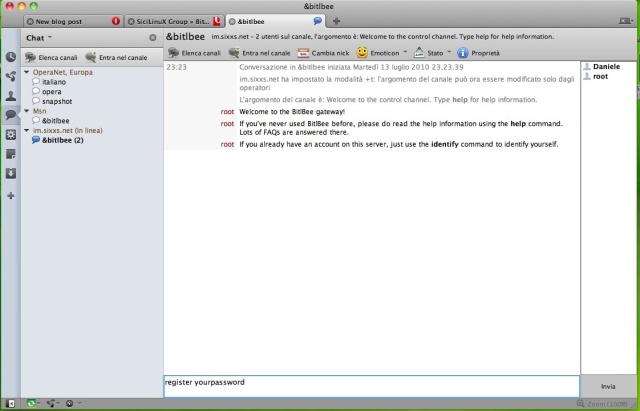
6. Now type: account add msn yourwindowsliveemail yourwindowslivepassword
7. Type account on and that’s it! For more details, visit the original post.
[digg-reddit-me]

About (Author Profile)
Vygantas is a former web designer whose projects are used by companies such as AMD, NVIDIA and departed Westood Studios. Being passionate about software, Vygantas began his journalism career back in 2007 when he founded FavBrowser.com. Having said that, he is also an adrenaline junkie who enjoys good books, fitness activities and Forex trading.
Subscribe
If you enjoyed this article, subscribe to receive more just like it.


I prefer to wait for the fix for Windows Live Wave 4 integrated MSN chat that’s coming very soon or use eBuddy. :P
of course this is not like a very comfortable solution and is in no way comparable to using a MAN-specialised or multi-protocol chat client.
But it’s a cool show off. Opera CAN do MSN… and that’s the point ;)
Yeah, but not without 3rd party service. Any IRC client can do it with im.sixxs.net. Not a big deal, but interesting though, and quite inspiring – why not to prepare unite based IM :P
why no opera unite? because nobody cares about this technology. during last month there was NO new unite apps released on my.opera. i dont know what is the sign of noone giving a damn, but this is close.
and yes, using a proxy server is somewhat lame..
So what if there was no new app last month, you should be happy, then Opera will keep pouring money into it and maybe they will die off; I thought it would make you happy. (Unite is long-term)
LOL, Unite is still alive?
What a piece of
unit is a longterm strategy? buaaaahahaahahahaha.
sorry but this is their most failed effort ever. it is a nice TOY. but opera userbase is too small, tools to write unite are nonexistent (dragonfly SUCKS! it is a simple crap) and reward for developers is negligible userbase that cant be monetized. developers already voted it DEAD. and users arent willing to fill the void.
they tried to look smart and cool, but you know, world moved on and requests extensions, not some fancy gizmos that in reality aren’t really useful. we are approaching the mark, when on average there would be one new app per month. this is simply pathetic. it is one of the biggest failures in recent internet history.
nobody, didn’t we agree that you would stop writing stupid shit?
i never signed anything, and what part is stupid anyway? care to elaborate or will you just spread fanboicreep evenly?
if you think opera unite is not crap – what ‘services’ do you use? how many have you written?
I’m using photo sharing a lot. I prefer it, instead of uploading my photos on some server – I have full control over the photos, there is no limitation in size, and its very quick – I just copy it from my camera, and voila! its available over the Internet :) It cannot get simpler.
My problem is that I have a laptop at the moment, but I’m thinking about buying desktop machine soon, which will be connected 24/7. Then I’m going to listen to my home music from work – so no need to carry those pen-drives all the time. Those are some serious advantages, I don’t know why in your opinion its “piece of crap”. I’m working on my own app, which IMHO has a great potential, but it must work on Opera handsets, so I need to put some extra effort (but now, thanks to css media queries it will be easier).
And dragonfly – have you took dragonfly developer survey?? And have you checked their latest dragonfly snapshot? Things are changing a bit faster recently, it has color picker now, and enable/disable css feature, and soon we can expect interface redesign, other stuff are on their way too.
What are your issues with Opera anyway? Whenever someone says keyword (opera, dragonfly or unite) you suddenly appear bitching about Opera in some blind and insane fury (believe me it looks like this even if you are not blind or insane). Looks like lots of personal issues. Every other mammal on that planet would simply do not care. What strange species are you? ;)
BTW. Not too mention User Javascript Manager which is awesome Unite app.
well, it isnt personal, however i refused to work at opera (low pay) after being interviewed some years ago, that was the closest to personal i ever get.
however what i do care is opera’ inability to admit their mistakes and blaming EVERYONE else and their dog for their own problems. and facts are, that opera is a marginal browser not because others hate it, but because opera decision making is stupid and inept. opera mini – their great gem will soon dissapear, as it reaps profit because of slow mobile networks. however networks are getting 10 or 100 times faster and reason for opera mini to exist will disapear. same as their only solid business model.
dragonfly? yes, saw the survey, even filled the forms. no use, go to gitHub and see the code commits. ONE engineer is working on it! ONE! single man, few hours a day. this is progress? please. let me remind you that in the time opera ‘developed’ dragonfly webkit managed to start, develop and complete fullblown suite of tools that in some cases even surpass firebug. they know that developer’ support is importatnt, opera ignores them. they ignore opera and then people cry and whine that ‘the bad developers browser sniff’. no they dont, they simply do not care.
unite? yeah, photo/video/music sharing is okay, it is simple and it somewhat works. however, people (mainly opera fanatics) claimed that this technology means’ unlimited possibilities and youll see’. it seems that these people were full of hot air, as after roughly a year there are 40+ apps out there. quite a fail for ‘unlimited possibilities’. that means that either opera users arent creative (doubt it, they are) or that this technology has a very very small real use. and as such is a big time fail. stupid extensions framework would increase marketshare by 100% percent or more and relieve burden from opera developers for developing small features. but not, opera knows better than entire world.
98% of the world begs to differ
MSN over IRC, that has existed for years… even MSN over Jabber has been around for more than five years.
I think the only news here are that people still use MSN for some reason.
” go to gitHub and see the code commits.”
It’s called BitBucket.
“ONE engineer is working on it! ONE!”
I do believe you have to check again.
“this is progress?”
Yes, there have been strides lately.
“however i refused to work at opera (low pay) after being interviewed some years ago”
Somehow, I do not believe this story, in order to be interviewed, you must consent it.
“and blaming EVERYONE else and their dog”
Please give me a press release where they say anything similar to: “It was there fault we lost market share”.
“opera mini – their great gem will soon dissapear”
Are you a market analyst? Many other companies take the opposite stance.
“however networks are getting 10 or 100″
Moore’s law will run out around 2020. Also, please give an example. Also, (lol) please show me where Opera is showing large signs of extinction.
” people (mainly opera fanatics) claimed that this technology means’ unlimited possibilities and youll see’.” Press Release, or just some idiot on a message board?
“quite a fail for ‘unlimited possibilities’”
This pre-supposses the truth of your previous statement.
“stupid extensions framework would increase marketshare by 100% percent or more”
It doesn’t seem to help Internet Explorer.
“but not, opera knows better than entire world”
They never said that, Charles McCantheville (hope I spelled it correctly) said “extensions are not in Opera at the moment because it would risk users a lot in terms of security”(paraphrase); as seen before by Mozilla and Chrome, extensions have, at times, hurt user’s safety.
“Somehow, I do not believe this story, in order to be interviewed, you must consent it.”
in my country companies disclose proposed salaries AFTER the interview, not before, so you risk wasting your time attending. job itself was ok, the pay was not.
gitHub/bitBucket – i was under impression that bitBucket is a UI for GIT repository. anyway – 25 commits (5 of them administrative – merges etc) for a week is a pathetic number. and yes, there is another engineer, given what he does, probably intern. still, i’d not call it ‘speedy and involved development’.
“””“opera mini – their great gem will soon dissapear”
Are you a market analyst? Many other companies take the opposite stance.
“however networks are getting 10 or 100″
Moore’s law will run out around 2020. Also, please give an example. Also, (lol) please show me where Opera is showing large signs of extinction.”””
opera mini itself is great. but it doesnt take to be a genius to see, that its main competetive advantage is bandwitch saving. that will soon cease to be important, because bandwitch will going to be only cheaper and cheaper. and in the moment when lost functionality (and opera mini is a toy browser, not full-blown one) outweights the savings (which do not matter on HSDPA/4g/lte speedy pipe) this advantage is gone. was it clear enough for you? moores law does not apply to wireless speed. why opera mini is a toy browser? you havent seen iphone browser, havent you? or android 2.2 one?
“”” people (mainly opera fanatics) claimed that this technology means’ unlimited possibilities and youll see’.” Press Release, or just some idiot on a message board?
“quite a fail for ‘unlimited possibilities’”
This pre-supposses the truth of your previous statement.””
ooh, ive seen enough claims of this by likes of haavard et al. that this is the future, that this will allow people bla bla bla. it seems that it is sharing tool, and other than that, world moved on and continued to develop stuff that matters.
“””“stupid extensions framework would increase marketshare by 100% percent or more”
It doesn’t seem to help Internet Explorer.””
IE9 looks as such, that it doesnt need any help, rather others will need one. it will be a great product. IE market share stopped falling this month and it is still massive compared to opera stagnant 2.2% ~2.5%
“””They never said that, Charles McCantheville (hope I spelled it correctly) said “extensions are not in Opera at the moment because it would risk users a lot in terms of security”(paraphrase); as seen before by Mozilla and Chrome, extensions have, at times, hurt user’s safety.”””
good that opera management does not lead IKEA. with this sort of thinking theyd sell only toilet paper and tissues, because you can kill somebody or yourself with everything else. this is one of the lamest excuses. along this is that opera offers ‘a lot more in one integrated package’. that is also BS because of quality of these offerings. most opera functionality was not updated since version 8. and they need updates and fixes. extension developer care for their creations, opera cant care for all of them because they are already overloaded. for how many more years cookie management (3rd party, deleting on quit, site specific) will work as it should? it was broken in early 10.0 and never fixed properly.. if firefox cant handle some stuff, i can always install extension. what can i do with opera? only ditch it and wait ages until they fix.
Bitbucket is a Hg front-end.
The Dragonfly repos, and some others, as a reference for those interested.
“anyway – 25 commits (5 of them administrative – merges etc) for a week is a pathetic number. and yes, there is another engineer”
You said there was one, anyway, many of the engineers e.g. David Storey, are working on Scope.
“because bandwitch will going to be only cheaper and cheaper… you havent seen iphone browser, havent you?”
Have you heard that iPhone users no longer have unlimited data? Yes, the even the users in America.
Do remember, there is Opera Mobile; I do not get what is going on right now, why they are dancing with maemo, but I hope they stop and focus on Android, I’ll agree with you there.
“Extensions”
I do think Opera should get extensions, but it is not needed as much as other browsers need it. Since Opera has the stuff built-in, you do not need the extensions as much. But, yes, Opera should get extensions, and/or they should upgrade what they have.
Look what came to dragonfly in the last few days.
“Opera Dragonfly now has an integrated color picker and easy enabling/disabling of style declarations. Try it :-)”
i saw these new features. firefox extensions that do the same are now nearing 6 years of age :/ and that css stuff is not only late by SEVERAL years, but also bad in comparison to what firebug offers.
yes, I’ve heard that some data plans are limited, im also on such plans – but i dare you to use up 5GBs per month, maybe with ipad, but with a phone you’d need to be a complete no-life. and i have iphone, had g1 and now use mainly galaxy S, never used more than 2GBs
opera Mobile is in some kind of limbo, i cannot understand why they are ignoring android and focusing on maoeaeaeaemoeo that will flop just like nokia is now disappearing. maybe android offers some hidden support for webkit browser and opera knows that they cannot compete in speed with them. maybe something else, i really do not know how it is possible that they are ignoring the most important player now (knowing that iphone is no-go)
and extensions.. while testing 10.70 snapshot i wanted to save youtube video. no way to do it (not looking trough some obscure userjs pages that even google has problems finding). casual user goes to addons menu and get what he wants.
dragonfly is of no importance for opera. they could’ve crunched unite in relatively short time, yet they assign one-two engineers (looking at bitbucket commit list there never were more than two at once) to DF. put 15 men there, pay for excesive overtime and crunch this damn thing opera! you are now behind EVERY SINGLE OTHER BROWSER! by years! no developer will ever try to anything serious with you, no matter how shiny your new engine is, because why bother? and then they complain that opera is ‘blocked’. it isnt – it is ignored.
“and that css stuff is not only late by SEVERAL years”
“Your point earlier was “Opera is not updating Dragonfly much” May I remind you of what you said earlier “this is progress? please.”
“but with a phone you’d need to be a complete no-life”
People work from their phone, others may watch a movie on YouTube and half of their plan is gone, now some rationing begins, that is where Opera Mini comes in. Also, Opera Mini can encrypt the data transferred, so if you are using some companies Wi-fi connection they cannot see what you are looking at, like they could see if you are using Safari.
“maybe android offers some hidden support for webkit browser”
Is that plausible?
“while testing 10.70 snapshot i wanted to save youtube video”
Opera:cache, clipnabber.com, another is going to ExtendOpera.com; and of course, I agree no normal user should have to put up with that.
“dragonfly is of no importance for opera. they could’ve crunched unite in relatively short time”
Unite?
“yet they assign one-two engineers (looking at bitbucket commit list there never were more than two at once”
There is more that goes on than what you see at BitBucket. Example: A design overhaul is underway.
“dragonfly is of no importance for opera”
The fact that it is making nice strides says otherwise, if Opera did not care about it at all, than there would be no Dragonfly.
“EVERY SINGLE OTHER BROWSER!”
I couldn’t hear you. :P
“and then they complain that opera is ‘blocked’”
No, it is sniffing, also, many times the code works in Opera when masked as Firefox.
“no matter how shiny your new engine is”
That reminds me, when 10.5 came out you said “Vega is not a nice new feature, Opera needed this for a long time, hardly anything” (paraphrase); but, when you look at canvas demos and such you find that Vega is the best at Canvas, SVG, etc. (Browsers only do better than Opera in that sense when they use they GPU)
shiny engine – webdeveloper (or company that employs him) has one goal, make money. if making a webpage for certain browser is way more difficult than it is for others (just like in opera case) then this browser will be dropped. not tested, not thought of, nothing. it will be served the same code as others, but if it fails, who cares. this is how this works, this is how it had been done for years. some of opera fans shouting ‘sniffing sniffing!’ seem to not understand, that sniffing COSTS MONEY. it is cheaper to leave it and let it rot, than deliberately write and then support sniffing code.
there are some cases when browser is known to not work and blocked at the start – then masking will help you enter the page (but it will break at some point, just like ignoring browser check in gmail led you to discover that chat window didnt work, and pages sometimes get stuck in infnite refresh, contacts were not updatetd etc..). but this is minority.
most of opera problems with webpages come from webdevelopers not testing against it (passive) and not from sniffing against it (active). webdevs have no incentive to test, because opera is the only browser with a piece of crap named ‘developer tool’ that really does not offer even the basic functions.
and my point about VEGA was – users do not care, they cant see it, they want other stuff that they cant do in opera now, they already could see webpages, it is nothing new for most of the users.
dragonfly progress? if you call TWO new functionalities, that shouldve take one day to complete a progress then we have different standards. look at webkit or even firebug (that is now complete, mind you) and see how PROGRESS looks like.
“Your point earlier was “Opera is not updating Dragonfly much” May I remind you of what you said earlier “this is progress? please.”
yes, i call it not updating, and not working. this is a project on life-support, with just manpower to not let it gather dust and to have an excuse for people like you to believe that good things a’ commin’.
yeah, UI overhaul.. they are TALKING about anything happening, i used to believe such stuff before I joined corpo world. now I only believe what i see, because the talk is worth a little nowadays.
BTW who use canvas and svg? when this -god-bless- technology will start to be popular? ive heard from opera-fanatics that opera is great because it supports svg, this technology of the future. yet, several years later svg still seems to not really interest anyone. where are the authoring tools for svg? how are developers suposed to create this stuff in cost-efficient way (and not by handcoding). if opera believed so strongly in svg, maybe they should heve created such tools (or.. better not, seeing how dragonfly looks like).
btw opera cache shows me that opera is still mangling file extensions of files in cache.. what a stupid move
“”””“but with a phone you’d need to be a complete no-life”
People work from their phone, others may watch a movie on YouTube and half of their plan is gone, now some rationing begins, that is where Opera Mini comes in. Also, Opera Mini can encrypt the data transferred, so if you are using some companies Wi-fi connection they cannot see what you are looking at, like they could see if you are using Safari.””””
yeah, encryption i a bonus, however i think that this will soon be widely available for others. however no serious company will allow anyone to use their wifi for private purposes. not because of time-waste, but because of serious security hole and possibility of IP leak.
if people work from their phones, they cant do that work on mini anyway, as it is VERY bad at any sort of interaction with webpages. it is fine for browsing, not creating. and if they do need to work from phone, their BlackBerry will take care of it
“””“maybe android offers some hidden support for webkit browser”
Is that plausible?””””
i think it might be possible, that some performance parts of browser are deeper in the core than browser itself (as core API, not browser API). i do not have any knowledge about this, because i never wrote something browser-like for android, but there must be a reason why oMobile is still not on android yet. and fear of sub par performance might be it