
How to Restore Safari Last Opened Tabs (Session)
During Safari 4 browsing experience on Windows, I couldn’t understand why Safari won’t restore my last opened web pages during the launch nor do find a way to do that. Fortunately, I have found a solution to do that and it’s really simple.
If menu bar is hidden, hit Alt to enable it, then click:
History > Reopen All Windows from Last Session
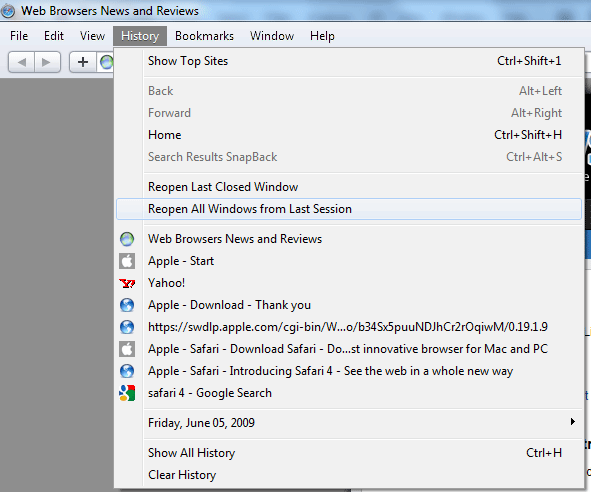
That’s it.

About (Author Profile)
Vygantas is a former web designer whose projects are used by companies such as AMD, NVIDIA and departed Westood Studios. Being passionate about software, Vygantas began his journalism career back in 2007 when he founded FavBrowser.com. Having said that, he is also an adrenaline junkie who enjoys good books, fitness activities and Forex trading.
Subscribe
If you enjoyed this article, subscribe to receive more just like it.


the problem in this solution is that if you opened already a new tab with content this option goes lost. (on mac os x 10.5)
:m
Is there any other solution?
Thank you SOOOOO MUCH!!! I nearly went crazy till I found your tip.