
Firefox: How To Backup Firefox Profiles, Bookmarks, Passwords and Other Data
If you are reinstalling your OS or just want to migrate Firefox settings into another PC, here is a simple tutorial on how to speed up the process.
– Download FavBackup
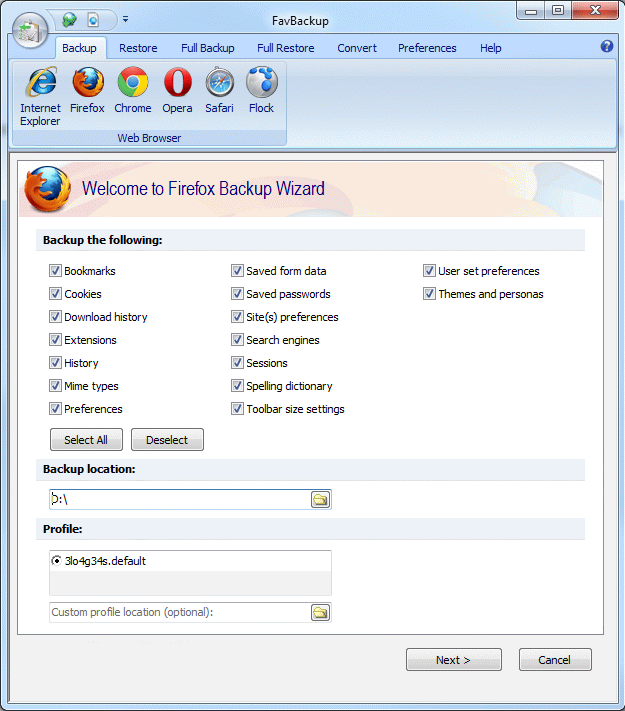
– Menu: Backup > Firefox
– Select from the available options:
Bookmarks
Cookies
Download history
Extensions
History
Mime types
Preferences
Saved form data
Saved passwords
Sites preferences
Search engines
Sessions
Spelling dictionary
Toolbars and settings
User set preferences
Themes and personas
– Select backup location
– Select profiles
Please note: if you want to backup all your profiles at once, simply select “Full Backup”, which will save everything, including cache.
– Click Next
– Job done. All you have to do now is click on “Restore” menu and repeat the process.

About (Author Profile)
Vygantas is a former web designer whose projects are used by companies such as AMD, NVIDIA and departed Westood Studios. Being passionate about software, Vygantas began his journalism career back in 2007 when he founded FavBrowser.com. Having said that, he is also an adrenaline junkie who enjoys good books, fitness activities and Forex trading.
Subscribe
If you enjoyed this article, subscribe to receive more just like it.


Ah, here we go. Next news of the site will be:
Chrome: How To Backup Chrome Profiles, Bookmarks, Passwords and Other Data
By Vygantas Lipskas | December 5, 2011
and next…
Opera: How To Backup Opera Profiles, Bookmarks, Passwords and Other Data
By Vygantas Lipskas | December 6, 2011
Good advertising strategy for your software! :D
LOL!
Come on, guys! We know how to do that! ))
“How to promote your software with redundant posts”
“How to buy forex”
“How to whitelist Favbrowser”
“How to donate to Favbrowser”
LOL