
Enable Google Instant Search in Opera
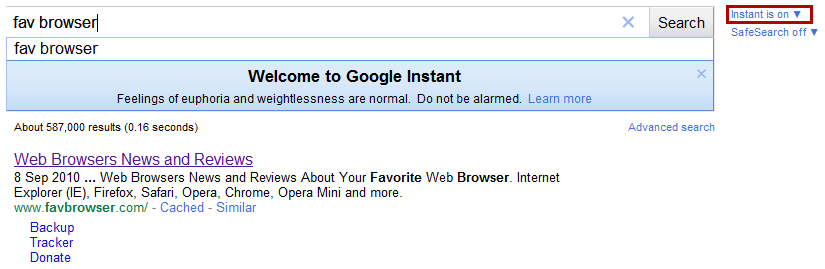
Here is a simple guide on how to get Google Instant Search to work on Opera.
1. Open Google.com
2. Right Click > Edit Site Preferences
3. Select “Network” tab, find “Browser identification” option and choose “Identify as Firefox”
4. That’s it!
P.S. Be sure to enable Instant (as seen in picture above).
Thanks to asfa, Ichann and Reddit for the tip.
Via: my.opera.com
Source: YouTube

About (Author Profile)
Vygantas is a former web designer whose projects are used by companies such as AMD, NVIDIA and departed Westood Studios. Being passionate about software, Vygantas began his journalism career back in 2007 when he founded FavBrowser.com. Having said that, he is also an adrenaline junkie who enjoys good books, fitness activities and Forex trading.
Subscribe
If you enjoyed this article, subscribe to receive more just like it.


And what is their explanation?? I mean it does work right? Who is using browser sniffing those days? Instead of features detection? So I bet its someone’s laziness.
Or, of course, Evil google conspiracy, which is hard to believe :P
It was the same deal with Facebook and @Mentions but I am a bit disappointed that Google is doing this now.
Thx for the info, Vygantas.
@narzędzia:
Don’t be naive, there’s only one reason for Google to do this. To discredit Opera and scare their users into switching to Chrome or another browser…and ultimately, try to kill off Opera as an entity.
Google has been browser-sniffing for Opera for years and still are, so these are not one-time mistakes by a rogue engineer (like the Street View WIFI data collection, *ahem*).
(Time to boycott Chrome to send them msg.)
or maybe opera is still incompatible with certain JS features that google happens to use?
@mentions was also OPERA problem, not only facebook one! this is most likely the same scenario.
given how opera still is prone to back button issues (with iframes adding themselves to history back list or back list clearing itself with no visual reason etc) it seems plausible to kill this feature entirely in opera if google found out that this error affects it.
masking as firefox still throws a lot of errors in opera, so it is not that it ‘works while masked’..
Opera seems to work fine if you use the trick, but Google probably doesn’t have time to support it. So they just blocked it to be on the safe side. No biggie.
How is the back button relevant?
seems to work fine != work 100% fine
opera throws errors while using this feature, and misinterprets certain keystrokes.
back button is relevant, because it is a feature users are expecting to work. instant search adds history of searches to the back button history, for user reference. opera seems to have a problem with that
opera itself admited that their key event implementation sucks – http://my.opera.com/sitepatching/blog/2010/08/16/key-events
so maybe this page is another one that suffers because of it, and not yet another GREAT CONSPIRACY AGAINST THE OPERA!
You are the one talking about conspiracies. I’m just pointing out that it works fine in Opera. But you are always obsessing over Opera, so…
it DOES NOT work fine in opera.
it does 90% of what other browsers do, so if 90% is ‘working fine’ to you, then i presume you are ok with your car brakes working fine, arent you
Nobbie’s obsessive compulsive behavior surfaces again, LOL. Keep obsessing over Opera, dude! I find it to be rather pathetic personally.
(And it still works fine here, but hey, keep obsessing!)
Poor nobody still desperately struggling to find something to fill the endless hours,
how about http://johnnybdesign.com/getalife.html
seems to work fine != work 100% fine
opera throws errors while using this feature, and misinterprets certain keystrokes.
back button is relevant, because it is a feature users are expecting to work. instant search adds history of searches to the back button history, for user reference. opera seems to have a problem with that
opera itself admited that their key event implementation sucks – http://my.opera.com/sitepatching/blog/2010/08/16/key-events
so maybe this page is another one that suffers because of it, and not yet another GREAT CONSPIRACY AGAINST THE OPERA!
about endless ‘getalife’.. funny thing is that, that only people that bring it up in conversation are these with dull life, no job and no spouse
Ahh dude. I didnt send this in. I sent the Firefox thing in.
I used this a whole back and liked it.
My bad then!
This is an useless feature for me anyway…
Google blocking Opera? I believe.
Same, guess I am one of those “older” people who does not acknowledge every new thing :-)
Give me clean a search UI without search suggestions, instant search, ads, sidebar and I am in.
Instead, they follow Bing and flood search results with useless stuff :-)
Oh well, at least you can disable some of those.
I won’t ever use this feature anyway.
I type directly in the address field…
I always type my search into the url bar. Sometimes I don’t see the Google website for several weeks and I haven’t seen all the other pages, which I added for quick search, for ages. I also don’t use the search bar. Its so much more convenient for me when I just enter the key and what I am looking for in the url bar. I certainly don’t care about Googles instant search.
Regarding the fact that Google is blocking certain services for Opera users, well that ain’t that bad actually. The new image search, Google introduced a couple of weeks ago, just sucks. If I still want to use it I still can change the Browser Identification.
Sounds relevant.
I thought this would get more attention. :-(
if Opera is any good as a company, their engineers are now frantically fixing core bugs that google instant tripped on. but given Opera track record, they’ll hit the ‘sniffing is bad’ and ‘standards are standards’ drum as they had always hit before.. and months later release browser.js fix, for few language versions
given how CRAP dragonfly is, it isn’t easy to spot what issues opera is having, but in short: history object manipulation fails. that means, that concurrent searches are not added to history (probably again too paranoid implementation of something).
there are some other issues, but again dragonfly is an utter CRAP, so if anyone skilled out there (that rules nvw out) he can try for himself. but before that, run a profiler in firefox and see what methods are run, then de-obfuscate the source and set wathers on history object. in firebug, opera is still ‘working on’ such features..