
Tag: Safari
Windows 7 Beta and Internet Explorer 8 Experience
I was playing with the public beta of Windows 7 for a while now and decided to show you a few neat features of it while browsing with Internet Explorer and just show the overall experience.
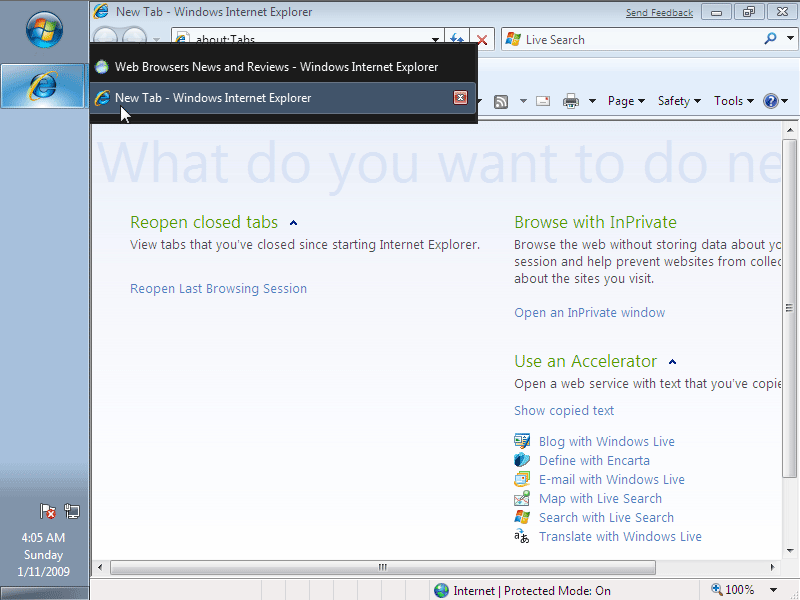
Windows 7 shows all opened tabs on Internet Explorer 8.
Browsers Market Share for the Year 2008
Previous year were great for some of the web browsers and not so good for Netscape Navigator and Internet Explorer.
Since it’s now 2009, let’s sum up all the market share reports and check final results.
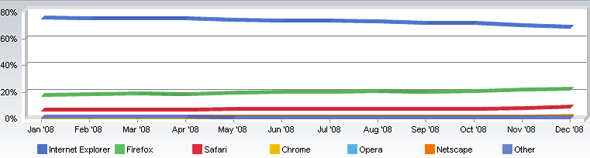
Internet Explorer lost 7.32% of its market share Continue Reading
Web Browsers Security Handbook
 Now here is something quite informative. Browser Security Handbook published by Google.
As Google explains, the document is meant to provide web application developers, browser engineers, and information security researchers with a one-stop reference to key security properties of contemporary web browsers.
The following browsers are included: Continue Reading
Weekly Browsers Recap, December 21th
 Sorry for not posting last few days. Had no internet (provider problems) connection since Thursday. Time to catch up.
- Google Chrome To Become Default Internet Web Browser
- Recent Updates Flood in for Google Chrome
- Test Finds Google Chrome, Apple Safari Weakest in Browser Password Management
- Analysis: Is Microsoft’s IE Flaw The Last Nail In Its Desktop Coffin?
- Microsoft releases patch for critical IE security flaw
- Firefox 2.0.0.20 now available for download
- Mozilla Officially Ends Support for Firefox 2
- Camino 1.6.6 Released
- Amaya 11 Released
Weekly Browsers Recap, December 14th
- Google dumps Firefox from download bundle, swaps in Chrome
- Fennec/Mobile Firefox coming to Symbian S60 in 2009
- Firefox, Chrome virtually tied for JavaScript speed
- Time for Mac Antivirus? Apple Safari Users Targeted on Facebook
- Microsoft Gets More Detailed About IE Vulnerability and Workarounds
- Skyfire rolls out UK mobile browser
- Net Applications again: Opera vs. Chrome – actual numbers vs. claimed market share
How to Disable Safari Font Smoothing
 Here is how you can turn off smooth fonts in Safari.
Edt > Preferences
Open Appearance tab.
Find Font smoothing setting which should be set to Strong and make it “Standard – best for CRT” instead.
[digg-reddit-me]


