
Pretty Colors – Firefox 3 Color Profile Support
 This one is really interesting find. Deb Richardson always wondered why photos (colors to be exact) do look different in Photoshop and Firefox 2. As it turns out, this is due color profile support which Firefox 2 doesn’t support. The good news is that Firefox 3 supports color profiles, although it’s disabled by default. To see what it is all about, check the picture below:
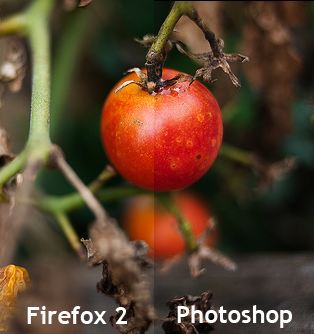
Notice the difference?
So why is it disabled by default? As it turns out, when color profile support is enabled, Firefox 3 performance decreases about 10-15% (performance tests). So yes, it’s not a good idea to keep this one enabled by default. Another problem is that plugins currently doesn’t support color profiles so colors may not match.
Here’s one more picture for you:
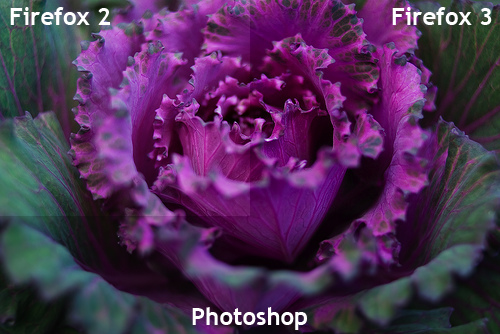
If you would like to turn this feature on, download and install Color Management add-on.
For more details and pictures, check Deb Richardson post.

About (Author Profile)
Vygantas is a former web designer whose projects are used by companies such as AMD, NVIDIA and departed Westood Studios. Being passionate about software, Vygantas began his journalism career back in 2007 when he founded FavBrowser.com. Having said that, he is also an adrenaline junkie who enjoys good books, fitness activities and Forex trading.
Subscribe
If you enjoyed this article, subscribe to receive more just like it.


Have down it, I only use Firefox 2, thank you share.