
Opera To Fix Default Installation Behavior
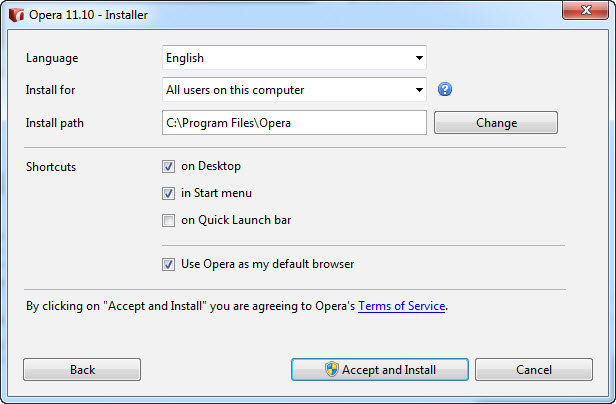
Ever since the release of Opera 11, the “set as default web browser” option is not visible in the standard installation routine. However, it is checked by default and whenever users proceed to install Opera, they soon find out that Opera has actually set itself as a default browser with no permission.
Don’t worry though; you can still do so by clicking on the “Options” button. However, other browsers do give you an option to check/uncheck the following setting during the default installation.
As a result, LifeHacker has contacted Opera’s Software Jan Standal, the VP of desktop products and received the following answer:
Since Opera 11, the option for choosing not to set Opera as the default browser was moved to the ‘options’ part of the installer on Windows. This, along with graphical/layout changes, was done in order to make the installer faster (reducing installation time from 2+ minutes to less than 10 seconds) and as easy as possible to use. An unintended side effect of this was that some users have reported setting Opera as the default browser by accident. We are listening to this feedback and will investigate possible alternative solutions.
According to the same source, Opera is said to be working on a solution but no time frame has yet been given.
Thanks, Ichan!

About (Author Profile)
Vygantas is a former web designer whose projects are used by companies such as AMD, NVIDIA and departed Westood Studios. Being passionate about software, Vygantas began his journalism career back in 2007 when he founded FavBrowser.com. Having said that, he is also an adrenaline junkie who enjoys good books, fitness activities and Forex trading.
Subscribe
If you enjoyed this article, subscribe to receive more just like it.


i would also like it to create an uninstall icon.
For me, it is very hard to believe that simply for setting the browser as default can make a difference such big as 2+ minutes to less than 10 seconds!
Haha…
Read again…
installer faster (reducing installation time from 2+ minutes to less than 10 seconds) and *as easy as possible to use* = less checkboxes = easier to users.
On the end users lose a choice, but wait, do you think people uncheck the other browser’s default browser checkbox just because it appears on the screen?
Users that bother with this would check the options…
Anyway, they’re going to “fix” it soon…
Don’t know but Australian English doesn’t work for me, I selected GB English(I do not think there is Australian English lol). when I type colour it tell me to correct it to color.
does anybody know how to fix it ?
O Menu> Settings> Preferences>General> English AU
That said mate, it still makes it correct in american english.
Yep I have the way you described. Do I need to submit a bug report ?
Yep
right clik the spellin mistake then> dictioaries>add dictionaries add English UK then select it
This is pathetic. All browsers kind of hide that info with different techniques and insist going back as a default. Did anyone see the IE9 “I’m not the default browser” *twice*? My point exactly!
At the same time the web is plastered with “Upgrade your browser” lies coming from Google. Nobody out there punishing false advertising?
Para mí está bien. Me gusta que sea una rápida instalación.
English: For me it’s OK. I like it because it’s a faster instalation than other browsers.
That and the ridiculous update reminder/nag screen that can’t be turned is one of the first signs how effed up Opera is meanwhile. Really sad after 6 years and so much hope – no real improvements to site compatibility, stability with Flash or anything else that’s important to have in a browser. Now it can’t even obey your preferences like any other browser. Sorry 2005, you can have Opera back together with its ivory tower devs and hardcore fanboys who reject any form of criticism.
yawn
I suppose the last sentence was written in an effort to fend of a possible replies? Do you really believe that there were no real improvements to site compatibility, stability with Flash or anything else that’s important to have in a browser, in the last six years? Care to elaborate?