
Internet Explorer 8 Keeps Crashing? Get Rid of Add-Ons
 Sometime ago, Microsoft has published a paper called “Enhancing the performance of Windows Internet Explorer 8” (download here), which states that add-ons are responsible for more than 70% of IE8 crashes and browser sluggishness.
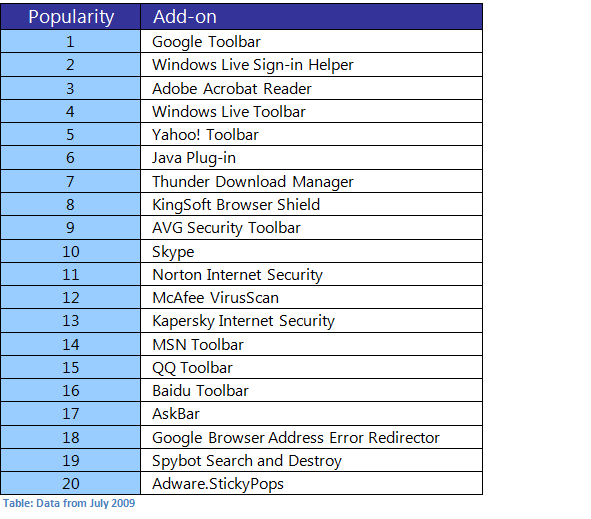
In addition, company has also shared a list of 20 most popular IE8 extensions:
Want to know if you are affected? Try running browser in “no add-ons” mode and see if you notice any improvements. You can do that going to:
Start > Run. Type in “iexplore.exe –extoff” and hit enter.
[digg-reddit-me]

About (Author Profile)
Vygantas is a former web designer whose projects are used by companies such as AMD, NVIDIA and departed Westood Studios. Being passionate about software, Vygantas began his journalism career back in 2007 when he founded FavBrowser.com. Having said that, he is also an adrenaline junkie who enjoys good books, fitness activities and Forex trading.
Subscribe
If you enjoyed this article, subscribe to receive more just like it.


I would put it like this: Internet Explorer 8 Keeps Crashing? Get Firefox!
FF also has some bad extensions, http://kb.mozillazine.org/Problematic_extensions
Nah Firefox has an inbuilt protecion feature. Want to know what it is? Go on guess.
Better solution: Get Chrome.
Firefox is crashy crap compared to Chrome.
Most of these add-ons are installed unintentionally, like install Java Runtime – you get Yahoo or Google toolbar, install Divx Webplayer you get Google toolbar & Chrome.
I would also bet 80% of the users will not use those toolbar.
It would be great if IE itself provides a performance tool which reports that every addon’s performance.
Sorry, I was too quick.
The performance tool option is already there in IE, I didn’t know that.
Thanks to FavBrowser for sharing this :)
test