
How to Enable Firefox 3.6 Tab Preview?
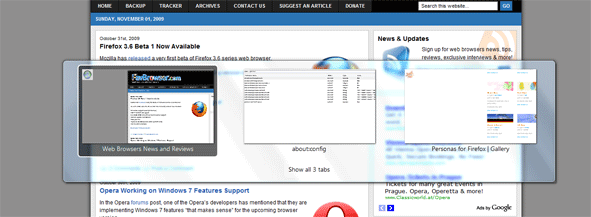
Here’s how you can enable tab preview in Firefox 3.6:
Type the following line into your address bar:
about:config

Look for:
browser.allTabs.previews
browser.ctrlTab.previews
Set both to true.
Use Ctrl + Tab to switch between tabs or Ctrl + Shift + Tab to get a list of opened ones.
[digg-reddit-me]

About (Author Profile)
Vygantas is a former web designer whose projects are used by companies such as AMD, NVIDIA and departed Westood Studios. Being passionate about software, Vygantas began his journalism career back in 2007 when he founded FavBrowser.com. Having said that, he is also an adrenaline junkie who enjoys good books, fitness activities and Forex trading.
Subscribe
If you enjoyed this article, subscribe to receive more just like it.


Is Tab preview in Firefox 3.6 better than Opera one?
With my configs + many tabs, it does not display thumbnails. Not sure if same applies for default installs.
Someone could please explain to me why Opera Software do nothing when competitors steal them ideas? It’s getting boring… t.t
Well what can they do, tell them to stop? They do not patent things because they are not going to damage the web like Apple does, Apple patents everything. >:@
It’s based on alt+tab switching as introduced somewhere around the times of Windows 3.
AOL Explorer 1.2 (2005-11) had Tab Switch Preview and Tab Hover Preview before Opera which got it in v.9 (2006-06-20).
Though it seems that tab preview when switching were turned off by default in Opera, until version 10.10 or something, for no apparent reason, so no one apparently knew about it anyway. Even now it only previews one tab at a time so it’s useless anyway.
I take it you think Opera should remove their Tab Dock? I mean OmniWeb 5 had it back in 2004.
Since then it’s been available in Firefox through Firefox Showcase (2006-01-07) and Tab Sidebar (2008-02-17). All way before Opera.
… or how about the ability to render HTML? Where that also ‘stolen’ by time-travelers?
maybe he meant what i was also asking myself:
when opera will start to steal OTHER’s ideas. because some of these are realy good, and are missing badly from opera
Stop whining about Opera, you moron.
By the way, you never replied to my reply to your lies and FUD in the “pwning Unite” post:
That list is 2 months old, and either only affected the pre-alpha demo/concept version, or are non-issues that are true for ANY web server.
Unite as a concept is secure. That doesn’t mean that there can’t be any security holes. Security holes can appear in any application.
Your irrational hatred of Opera is really making you blind to the fact that your irrational bashing of Opera in this case means that you have to irrationally bash anyone who creates a web server!
LOL, Unite doesn’t mask your IP address?! If THAT is a security issue, then THE WHOLE INTERNET IS A SECURITY ISSUE!
You are and will always be a moron.