
How to Add WolframAlpha to Your Web Browser Search Engines List
WolframAlpha has been getting a lot of buzz recently from all over the internet (no, it’s not a web search engine), so why not post about it here?
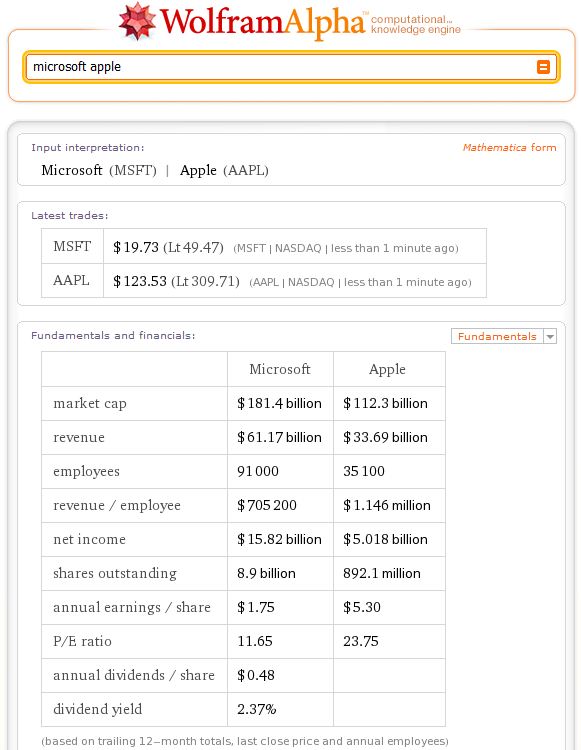
If you haven’t heard about it yet, it’s basically a “knowledge engine” with lots of valuable data. For instance: by typing “microsoft apple” you will see its stock price, dividend information, average returns and more:
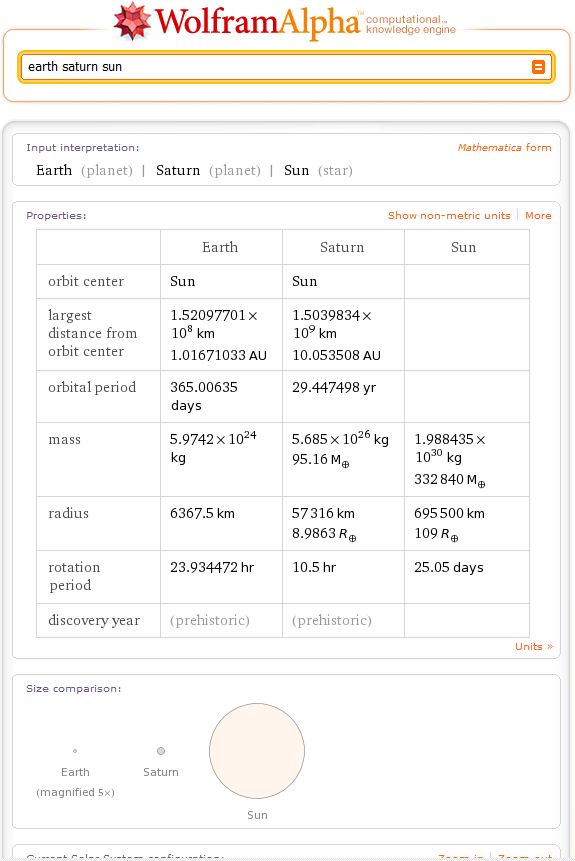
Earth, Saturn, Sun results
Add WolframAlpha to:
Internet Explorer
Open the following page and enter:
URL: http://www.wolframalpha.com/input/?i=TEST
Name: WolframAlpha
Hit Install button
Firefox (and its based web browsers)
Just install the following add-on and you are ready to go.
Safari
I haven’t found a way to add any additional search engine on Windows OS.
If you are using Mac OS, feel free to try Saft
Chrome
Right click on the address bar > Edit search engines > Add
Name: WolframAlpha
Keyword: W
URL: http://www.wolframalpha.com/input/?i=%s
Opera
Tools > Preferences > Search: Add
Name: WolframAlpha
Keyword: W
Address: http://www.wolframalpha.com/input/?i=%s

About (Author Profile)
Vygantas is a former web designer whose projects are used by companies such as AMD, NVIDIA and departed Westood Studios. Being passionate about software, Vygantas began his journalism career back in 2007 when he founded FavBrowser.com. Having said that, he is also an adrenaline junkie who enjoys good books, fitness activities and Forex trading.
Subscribe
If you enjoyed this article, subscribe to receive more just like it.


For Opera it’s easier to just right-click into the search field on the WolframAlpha site and choose “Create Search…”, give a keyword of your choice and click “OK”. Done.
You are right, thanks for a tip!
Damn you Wilmer, was going to suggest that! *grins*
It’s a really sweet engine, but it’d be nice with some way to know if the info aggregated was actually true, because right now I can’t see if there’s any reference materials.