
Google Chrome 13 Can Hide The URL Bar
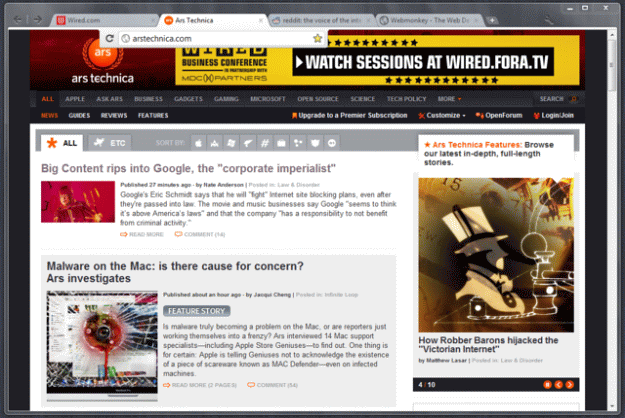
Windows only.
If you are up for a new experience and don’t mind potential phishing sites threat, then Google Chrome 11 Canary might be the browser to get as its latest release includes an option to hide the URL bar.
How do you enter the URL?
For user to access the mentioned text box he or she must click on a browser tab and bingo, it reappears.
How to hide the bar?
Enter about:flags in the address bar
Find compact option and enable it
Right click on the tab bar and select “Hide the toolbar”
What do you think? Useful or useless?
Via: ArsTechnica
[Thanks, Ichan]

About (Author Profile)
Vygantas is a former web designer whose projects are used by companies such as AMD, NVIDIA and departed Westood Studios. Being passionate about software, Vygantas began his journalism career back in 2007 when he founded FavBrowser.com. Having said that, he is also an adrenaline junkie who enjoys good books, fitness activities and Forex trading.
Subscribe
If you enjoyed this article, subscribe to receive more just like it.


This could be done in Firefox and Opera for the longest time, no? o.O
Might want to mention this is only in the Windows version. Not yet supported in the Mac version.
Sorry, thought I did that. Fixed.
Yes, other browsers have it for a long time now, but chrome is the youngest one, it’s pretty fast and pretty amazing, but still lacks lots of functionalities
You people are forgetting that although you can hide the address bars in Opera and Firefox respectively, you will have to go through the menus or hit a combo of buttons to get it back. This is a more permanent solution
I thought F2 does the trick? That’s in Opera anyway, not sure about Firefox.
Aka “Combo of button’s” fine its a shortcut key.
Armin is right. F2 or even Alt-D will bring up the address bar in Opera.
For maximum screen real estate, use Opera. You can hide the Address bar, Status bar, and even the Tab bar. All that is left is the Windows title bar. Then use Ctrl-T to open a new tab and hold right-click and scroll the mouse wheel to navigate the open tabs (or Ctrl-Tab through them).
In opera go full screen & you have easy access to the Panels F4 address field F2 & can easily toggle any tool bar with a keyboard sequence, example for address bar Alt l a
Opera rules.
Every Browser does that in fullscreen
yeah wish they had extension for opera like firefox has that less chrome hd addon
Why doesn’t it require a restart? :O
Good move Chrome! come on, you are now closer to Opera, but should try harder! just copy some other things and you may be done.
Haha, it must be so mentally fatiguing to be an Opera fan.
This is awesome. Not only will it save me screen estate, it will encourage me to use Ctrl/Cmd+L to focus the address bar.
Opera, the best browser.