
Web Browser for Kids – KidRocket Review
 This is a guest post by Dwarka Rao from Review Unit, a blog with tech reviews and latest news.
Parents are aware of the ugly side of the Internet, so it is their obvious responsibility and worry to allow their kids to make the best of Internet in order to learn things in the safest environment. You cannot always keep an eye on the activities of your children while they are on Internet. This requirement has evolved in the form of kid browser.
As the name reflects, KidRocket is a web browser designed for the kids. The best thing about KidRocket is that it offers all the required features in the easiest possible way so that your kid can get the core of it easily. It also helps you to keep your files and folders safe from your jubilant, curious and naughty children.
KidRocket does not require any add-ons or extra components to run it smoothly, which is the best thing about this Internet browser for kids. Now you need not do a heavy research to block the web sites that are not meant for your kids, KidRocket simply allows your children to use trusted web sites.
Despite of offering such features, they designers have made sure that the looks of KidRocket relates to kids by making use of attractive colors. You cannot keep your kids unaware of the pillar stone kind of device of the cyber age namely “Computer”, just because it has got a black side. KidRocket allows you to completely lock your desktop and provides a complete different environment to your kids, where they can learn, play and have fun in an innovative. Below are some of the amazing features offered by KidRocket:
• ART
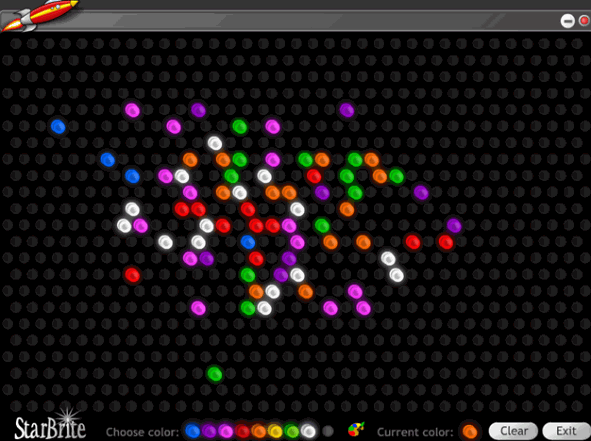
This is the place where the artistic side of your kids pops out. It has features like Doodle and StarBrite to offer where they can play with colors by demonstrating their imaginative ideas on the desktop
• MATH
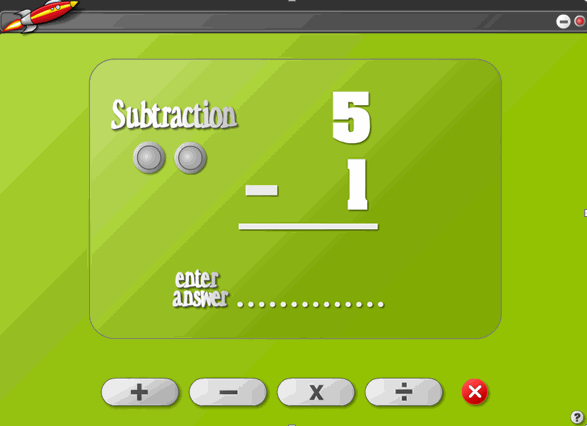
KidRocket is not about allowing your kids to play games; it ensures that your kid learns things with fun factor involved. KidRocket allows your kid to practice basic Math concepts like addition, subtraction, multiplication and division in the feature named as MATH. This feature provides questions to your kids in the form of flash cards, which makes it a learning application in innovative an interesting manner.
• EMAIL
Your kids can use the email service which is the most fundamental use of Internet. KidRocket lets your children habituated to email service. Your kids can also take out the prints of their mails. And if you consider this feature as an unsafe options your kids can misuse it, then you can easily block the email feature.
• ADMIN
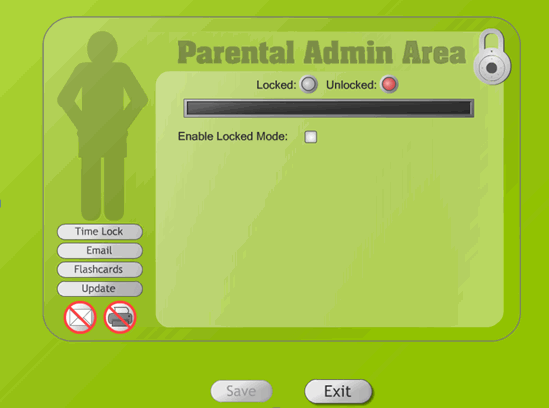
Parents find this feature most useful as they get to set the time for which you kid can use this web browser. Once the time is over, the browser gets inactive. This is a kind of feature that parents were looking for since a long while. Using ADMIN, you can restrict your kids to spend limited time on computers.
• LAUNCH
This is the killer feature offered by KidRocket. This option allows your kid to come close with the Internet world in the safest way by providing the access to trusted web sites which will not harm your kids. You need not monitor your kids activities while they learn and play on the safest web sites present on world wide web.

Once you make your kids habituate to use this web browser, you can get carefree about the files and folders stored in your computer. And you need not be apprehensive about the web sites accessed by your kids, if they are using KidRocket.
Install KidRocket on your computer and ensure that your kids learn and play on computer in a safe environment in an innovative manner.
[digg-reddit-me]

About (Author Profile)
Vygantas is a former web designer whose projects are used by companies such as AMD, NVIDIA and departed Westood Studios. Being passionate about software, Vygantas began his journalism career back in 2007 when he founded FavBrowser.com. Having said that, he is also an adrenaline junkie who enjoys good books, fitness activities and Forex trading.
Subscribe
If you enjoyed this article, subscribe to receive more just like it.


Great initiative. Big positive.
I wasn’t able to check it right now, so maybe someone is aware what its based on? Gecko? KHTML? IE??
I really don’t see the use for this. It’s easy to circumvent for anyone eight years or older, unless it’s their first time using a computer.
It’s just a false sense of security and is on the same level as parking the kids in front of the television and thinking it will turn them into better people.
It would be better if they introduced the kids to programming or politics if they are interested.
Also, contrary to popular belief, seeing boobs or a ‘bad word’, like “fuck”, won’t turn kids into prostitutes or drug addicts.
The best thing is to let them have their own computer and clean up their own mess after downloading “Ultimate cracker 2k” (aka infecting the computer with virus, trojans and its ilk). Just see to it that it’s isolated from all other computers on the network.
@Zawory
So most likely it’s yet another shell for IE.
You don’t see the use for this? Really? OK, so you are either not a parent or a really lame one. It makes me wonder what kind of garbage you would let your own kid look at. Thanks for donating to the ongoing societal effort to kill off early childhood innocence. The human race owes you one there pal. What a schmuck.
Not to be hard on you, but there is a reply button and while it might be too much of a mental challenge for you there is also more than one sentence in my original comment.
If you happen to manage to read more than one sentence this time: I would like to point out that the lame parents are the ones who just leave the upbringing of their kids to a simple machine.