
Tag: Tips
Opera: Quick Tip
Click and hold the Back button and you’ll get a list of all visited pages for the current tab.
Via Twitter.
10 Great Opera Speed Dial Backgrounds
If you are using Opera and can’t find any good Speed Dial backgrounds, then check the following post, because it has some great ones (in good resolution).
Continue Reading
Speed Up Your FireFox with SpeedyFox
 If you’ve been heavily using Firefox web browser and noticed decreasing performance, then maybe it’s time for you to try new tool called “SpeedyFox” (Windows only).
What can it do?
Boost Firefox startup in up to 3 times
Speed-up browsing history
Quicker operation with cookies
So how does it work? Continue Reading
YouTube Video Lags in Firefox?
If you are experiencing video jumpiness while watching videos in Firefox web browser, then here is a possible solution (as from LifeHacker):
“The quick fix for this problem, at least for my own sake, is to increase the time between each of the saves performed by session restore. By opening about:config in your Firefox address bar, then typing browser.sessionstore.interval in the filter box, you’ll see a value of 10000, which is in milliseconds. (Meaning your session is saved every 10 seconds.) I changed this to 300000, or every 5 minutes, as I don’t have the urgent need for tab restoration. If you feel like being more on the safe side, try increasing it to something a bit lower, say 120000, or every 2 minutes.”
How to Remove/Disable Opera Systray Icon
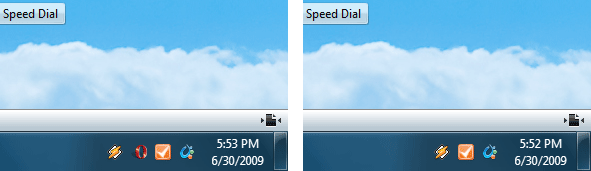
If you love clean working environments, then this is a must use tip for every Opera user. Ever got annoyed by system tray icon? Want to remove it? It’s easier than you thought.
Windows
Right click on Opera shortcut > Properties
Find target fields which should look similar to this:
Target: “C:\Program Files (x86)\Opera\opera.exe”
Replace with: “C:\Program Files (x86)\Opera\opera.exe” /notrayicon (with quotes).
Linux
Find your launcher and edit it by adding -notrayicon in the end.
opera %u -notrayicon
Update: there is an option in opera:config now, check this post for more details.
Opera: How to Remove Search Engine from Speed Dial?
 It’s actually easier than you thought.
Go to:
Tools > Preferences > Search
Select search engine which is used in your speed dial (Ask.com, if default)
Edit > Details > uncheck “Use as Speed Dial search engine”
How to Disable Opera 10 Visual Tabs
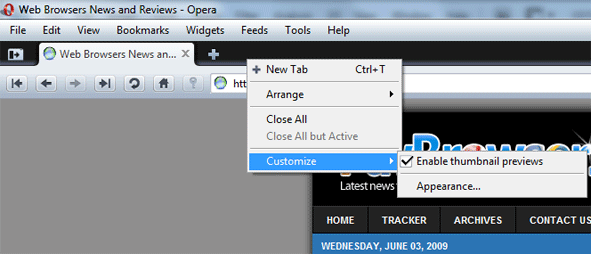
It’s easy and simple, just right click on the tabs panel and uncheck “Enable thumbnail previews”.
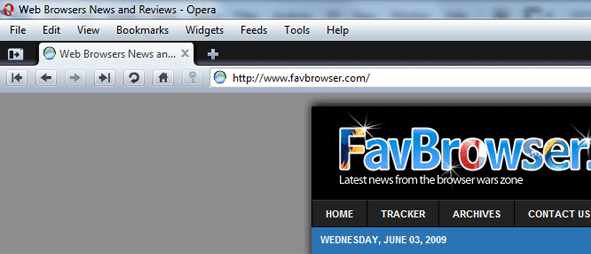
Opera 10 with removed visual tabs.
Convert YouTube Videos to MP3
In case you want to convert YouTube videos to MP3, here is a simple Firefox add-on to do that.
Basically, it adds a “Convert & Download as MP3” link in video page. Just click on it and download starts.
Vist YouTube 2 MP3 page (addons.mozilla.org).
Check Hotmail in Safari 3 and 4
If you are a hardcore Hotmail and Safari user, then mail check issue is not a new thing for you. Fortunately, there’s a quick way to fix that.
Preferences > Show Menu Bar
Preferences > Advanced > Check “Show Develop menu in menu bar”
Once developer menu appears, go to:
Developer > User Agent and pick “Opera 9.63 – Windows”
This is it. Enjoy your browsing experience.


