
Tag: Opera
Disable Windows 7 Tab Thumbnails in Opera 10.5
 Here is a quick way on how you can disable Windows 7 Aero Peek for Opera 10.5 web browser.
Right click on opera.exe
Properties > Compatibility, check “Run this program in compatibility mode” and select Windows Vista SP.
Apply settings.
That’s it.
Update:
You can now type the following text in the address bar:
opera:config#UserPrefs|UseWindows7TaskbarThumbnails
Uncheck highlighted setting.
Thanks to Rafael Luik for that!
[digg-reddit-me]
Benchmark: Internet Explorer 8 (IE8) vs. Firefox 3.7, 3.6, 3.5 vs. Chrome 4, 3, 2 vs. Opera 10.5, 10.1 vs. Safari 4
Yet again, it’s time to test latest web browser releases, including Opera 10.50.
Tested browsers:
Internet Explorer 8
Firefox 3.5.6
Firefox 3.6 Beta 5
Firefox 3.7 Pre-Alpha 1 Continue Reading
Opera 10.50 Pre-Alpha Is Here!
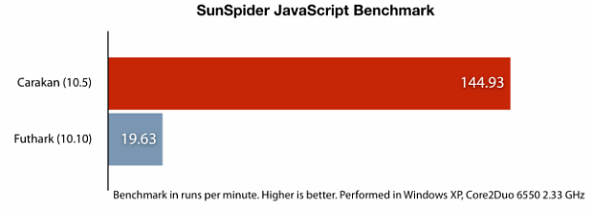
This is it, Opera has just released Opera 10.50 pre-alpha, featuring their new Carakan JavaScript engine, updated Vega graphics library and Presto 2.5 rendering engine.
Weekly Browsers Recap, December 21st

- Bugs and Fixes: Zero-Day Patch for Internet Explorer 6 or 7
- Mozilla exec: Bing is not popular enough for Firefox
- Mozilla thinks mobile Firefox will kill app stores
- Firefox 3.5 is Now the World’s Most Popular Browser
- Jetpack goes mobile
- Firefox, Adobe top buggiest-software list
- Firebug may slow down Firefox
- Congrats Mobile Add-on Challenge Winners
- Five Ways to Cover Firefox in Chrome
- Give the Gift of Google Chrome this Christmas
- Chrome Drops Safari Into Fourth Place Among Browsers
- Native JSON support in Opera
- Opera Mini 5 beta 2 now available in 26 languages
- European Commission and Microsoft Elect To Include Flock In Browser Ballot Screen
- Browser Ballot Screen: Maxthon to be included as well
Thanks to Nox for links!
[digg-reddit-me]
Opera 10.50 Leaked: Screenshots, Features and Download Links
 Our reader Somebody has come across a DownloadSquad post about presumably leaked Opera 10.50 pre-alpha build.
Although this isn’t likely to be a version, which is coming on Tuesday (as there are no noticeable JavaScript performance improvements), it still includes some of the upcoming new features, such as:
Private browsing
Windows 7 integration
Improved find
Presto 2.5
… and improved user interface
On the other hand, new JavaScript engine might appear only in newer alpha releases. We will find out very soon. Continue Reading
Opera 10.50 – No Presto 2.4 for You, Prepare for Presto 2.5
One of Opera employers confirmed via Twitter that Opera 10.50 will be using Presto 2.5 instead of 2.3 or Rumored 2.4.
“@Malarkey, sorry, but there will be no Presto 2.3 inside. Only 2.5. I’m not kidding ;)”
David Storey also said:
“Its not using Presto 2.3. It is using something quite a bit newer.”
Thanks to Daniel Hendrycks and somebody for links.
[digg-reddit-me]
Opera 10.50 Coming, Carakan, Presto 2.4 Rumored
Today, Opera Software has announced, that on December 22nd, they will release a pre-alpha version of Opera 10.50.
Although no details were revealed, expect speed, that’s what was said: “We don’t want to say too much and ruin the gift, but expect speed.”
What is Carakan?
Carakan is the upcoming Opera’s JavaScript engine, which was already more than 2.5x faster during early development stages, when compared to Opera 10.
What is Presto 2.4?
Presto is Opera’s new layout engine, which is still under development but already used by Opera Mobile 10.
[digg-reddit-me]
Weekly Browsers Recap, December 14th
- Microsoft CSS Vendor Extensions
- Mozilla exec urges Firefox users ditch Google for Bing
- Mobile Firefox release candidate coming as early as next week
- Move the Close Tab Button in Firefox
- 6 Killer Extensions for Google Chrome
- Why Mac Google Chrome is Better
- Opera on Google Chrome OS: what me worry?
- Opera Mobile 10 Comes to Android Via Carriers and Manufacturers
- Opera Mini Minor Server Upgrade
- Google’s Mac browser whips Firefox and Opera, lags Apple’s Safari
- WebGL Draft Specification Now Available
Thanks to Rob for links.
[digg-reddit-me]
How to Remove Opera Small Blue Dots Near Tabs?
If you are annoyed by those white/blue dots appearing in your tab tab, then here is a solution on how to “disable” them:
1. Download the following skin (still pending Opera approval, so mirror is at FavBrowser.com).
2. Close Opera.
3. Place file to “C:\Program Files (x86)\Opera\skin”, “C:\Program Files\Opera\skin” or other location, where Opera is installed.
4. Open Opera and go to: Tools > Appearance… > Skin and select “Reloaded”.
5. Enjoy.
Before:

After:

[digg-reddit-me]
Opera Passes 90 Million Users Mark
Good news today came from Opera Software headquarters, as company announced that their desktop web browser is now being used by more than 90 million users worldwide. With the upcoming Opera 10.20 Final release, we might see 100 million users very soon.
“It’s exciting that Obama has come to Oslo during this time of celebration for Opera,” said Jon von Tetzchner, CEO of Opera Software.
[digg-reddit-me]


