
Tag: Google
Weekly Questions Recap, March 7th

Don’t forget that you can receive points for asking/answering questions and redeem them for cool prizes.
Unresolved
Onclick Javascript Does Not Work in Google Chrome and Firefox?
 If you have found that onclick event does not work on Google Chrome, Firefox and Safari web browsers, then here is quick way to fix it:
Replace onclick form id with its name
For example, let’s say you have the following:
id=”form1″ name=”checkform1″
Find JS event:
onclick=”document.form1.cSSld.value=””
Replace with:
onclick=”document.checkform1.cSSld.value=””
All set. It now works with all web browsers.
Web Browsers Usage By Country
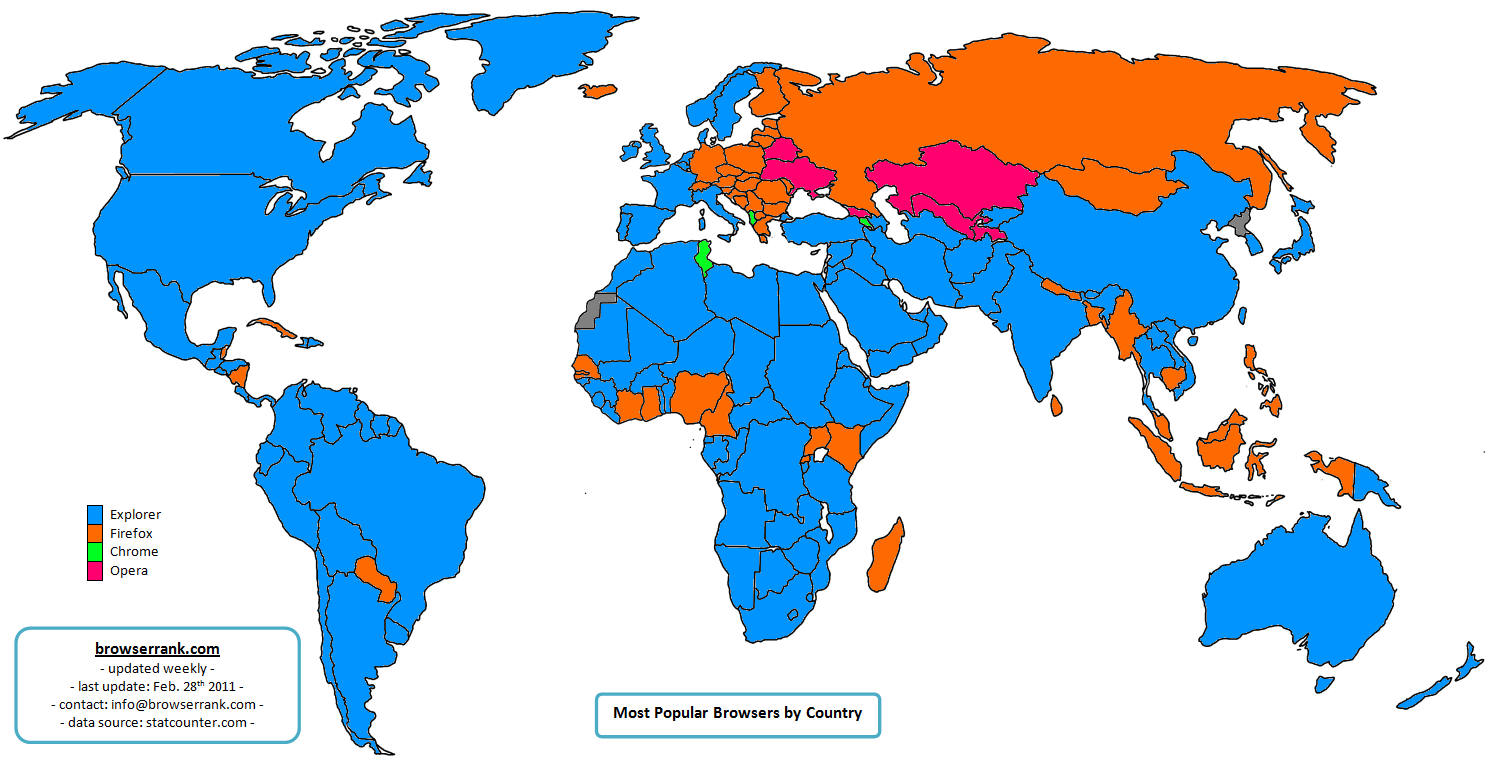
BrowserRank has put up a world map which displays the most popular web browsers in various countries, both desktop and mobile.
19 Chrome Bugs Fixed in Preparation for Pwn2Own Hacking Contest
 Nine researchers were paid a total of $14,000 in bug bounties for bringing the Chrome bugs to Google’s attention. The company then promptly patched them last Monday.
Pwn2Own, an annual hacking contest that takes place at the CanSecWest security conference in Vancouver, British Columbia, was most likely the trigger for the updates, for Google fixed security flaws a week before last year’s Pwn2Own contest as well.
Continue Reading
February, 2011 – Internet Explorer, Google Chrome, Safari Share Up; Firefox, Opera – Down
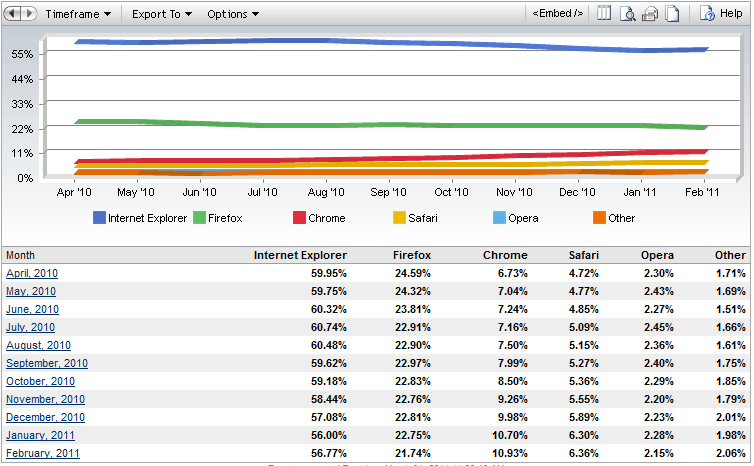
It’s the 1st of March already, so let’s dive into February market share data.
With the release of Internet Explorer 9 RC, Microsoft has taken some share back, up from 56.00% to 56.77% (0.77 point increase).
While everyone awaits the final version of Firefox 4, an open source web browser continues the downtrend, from 22.75% to 21.74% (1.01 point decrease).
Continue Reading
Weekly Questions Recap, February 28th
Don’t forget that you can receive points for asking/answering questions and redeem them for cool prizes.
Unresolved
Web Inspector, Now with CSS Tracking
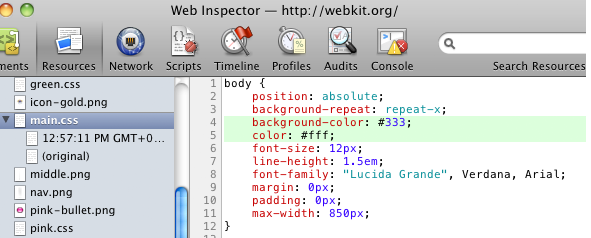
Good news, the team behind Web Inspector has pushed a new version that improves CSS editing capabilities.
What’s new?
The Web Inspector will now show all the declared properties, even the ones that are not understood by a web browser.
Color property values can now be shown exactly as they written in an inline style.
It now uses two separate fields for property name and value.
And best of them all: the history of style sheet. This means that you can now track all the CSS changes that were made during editing.
Overall, it’s a nice update and we hope to see CSS tracking implemented into other dev tools as well.
For even more details, visit the original post.
CTRL+F in Google Chrome Is Awesome
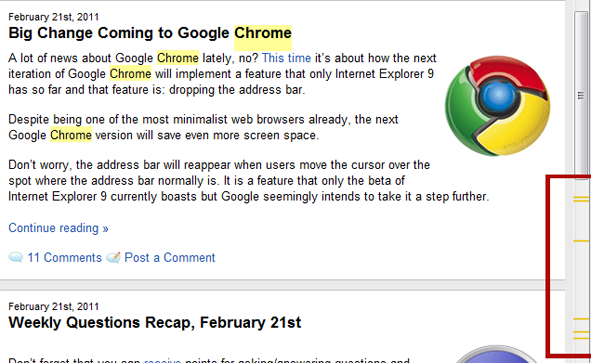
Although I find myself using find function quite often, I haven’t noticed this Google Chrome feature before:
It shows in the scroll bar where the word you’re searching for is located.
Via: Reddit
Big Change Coming to Google Chrome
A lot of news about Google Chrome lately, no? This time it’s about how the next iteration of Google Chrome will implement a feature that only Internet Explorer 9 has so far and that feature is: dropping the address bar.
Despite being one of the most minimalist web browsers already, the next Google Chrome version will save even more screen space.
Don’t worry, the address bar will reappear when users move the cursor over the spot where the address bar normally is. It is a feature that only the beta of Internet Explorer 9 currently boasts but Google seemingly intends to take it a step further.
Continue Reading
Weekly Questions Recap, February 21st
Don’t forget that you can receive points for asking/answering questions and redeem them for cool prizes.
Unresolved
- Web-browser battle: which are you using and why?
- Suggest some skin/theme for firefox, opera, chrome?
- Why does Opera fail to grab a good per cent of user base like IE/Firefox/Chrome?
- What was the first browser you ever used?
- Help to Disable Panel While Checking Feeds?


