
Tag: Google
Google: There Are Now 750 Million Chrome Users
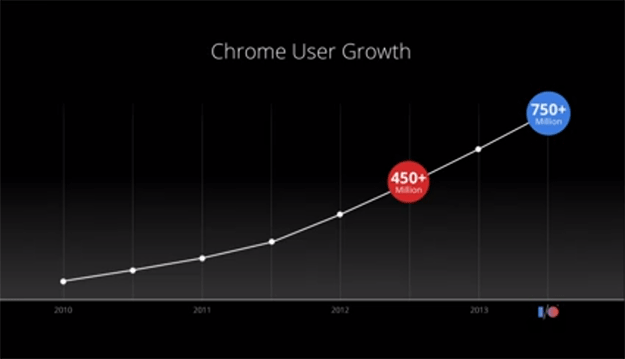
In today’s Google’s I/O event, the search giant has revealed that their user base has increased to over 750 million users, up from 450 million since last year.
The keynote itself is not yet over, head over to the following page for a live stream URL.
Chrome Office Viewer Now Available
 Windows and Mac only.
In case you are one of those rare individuals who does not use Microsoft Office, then Google has got you covered.
Thanks to a newly released “Chrome Office Viewer” extension, you can now view Microsoft Word, Excel and PowerPoint files in your web browser, no Office required.
Sounds good? Give it a go.
Microsoft Trademarks “Blink”
Google takes notice.
As you might know, Google has recently announced its new rendering engine called Blink, which made us wonder whether or not Microsoft will soon be involved. Why? If you are a Windows Phone user, then there is a high probability that you are already using a photography app by Microsoft Research (first demonstrated in September 2012), which too is called “Blink”.
Continue Reading
Google Chrome For Android And iOS Updated
After the recent update for PCs, Google has also published a new build of iPhones, iPads and Android handhelds.
So what can you expect from this release? Starting off with tablets, you can now access your tab history by holding back button and in case this isn’t exactly your cup of tea, there is another improvement: a full screen mode, which will be triggered when you scroll down.
Continue Reading
Download Google Chrome 27 Beta
With performance improvements.
Good news for all the Chrome users out there, Google has just pushed a new update to its Beta channel, which brings some welcome enhancements.
The good news? These are not JavaScript performance improvements that browser makers seemed to be milking for quite some time now. Instead, Google Chrome 27 will now display web content about 5% faster, thanks to the much more aggressive resource scheduler.
Continue Reading
Google’s Blink Q&A (Video)
Blink is coming to Google Chrome in roughly 10 weeks.
After announcing its departure from WebKit, Google held a Q&A session, which can be seen in the video below.
If you don’t feel like watching all of it, here is a list of questions as well as a timeframe so you can jump to the segment that interests you:
Continue Reading
Google Plans To Ditch WebKit, Announces Blink
No more vendor prefixes.
Now here is something that you won’t see very often. Yesterday, Google has announced its plans to “ditch” WebKit and develop their own rendering engine called . Now, before developers get a heart attack, it should be noted that Blink (when it comes to standards) is pretty much a rebranded version of WebKit, at least for now.
So why do it at all? As explained by Adam Barth, the software engineer at Google, it’s all about reducing the complexity and simplifying your overall code base. In fact, it’s estimated that right off the bat they will be able to remove over 7,000 files with a total of 4.5 million lines in code, which says a lot.
Where all these complexities come from? According to Adam, “Chromium uses a different multi-process architecture than other WebKit-based browsers, and supporting multiple architectures over the years has led to increasing complexity for both the WebKit and Chromium projects.”
Continue Reading
Download Google Chrome 26 Final
Brings spell check improvements.
Just when you thought that spell check couldn’t get any better, it just did. Thanks to the recent Google Chrome update, the search giant not only added additional languages and improved dictionaries but also brought one important change: dictionary synchronization. No more will you have to re-add internet lingos and product names whenever you use Chrome on a new PC, the life is now headache free.
In addition to that, the “Ask Google for suggestions” feature now supports grammar checking, proper nouns, homonyms and more.
Continue Reading
Turn Your Favorite Website Into A 3D Maze Game
Who said that you need to wait till Friday to have some fun? Thanks to the latest experiment from Google, you can transform your favorite web site into a 3D maze game. The only requirement? You need to have a browser that supports WebGL, which isn’t a hard task to do.
Simply head over to the following page and enjoy yourself.


