
Category: Tips
Convert Flash to HTML5
 Adobe has released an experimental technology codenamed Wallaby which is designed to convert Flash (FLA) to HTML files.
Although not all features are yet supported, it’s a welcomed step forward.
Wallaby is free to use, so if you want to give it a try, here is a download link.
Weekly Browsers Recap + Bonus Links, March 7th

FavBrowser.com
- February, 2011 – Internet Explorer, Google Chrome, Safari Share Up; Firefox, Opera – Down
- Web Browsers Usage By Country
- How Would You Change Internet Explorer?
- IE6 Countdown
- Download Firefox 3.6.14 And 3.5.17
- Onclick Javascript Does Not Work in Google Chrome and Firefox?
- 19 Chrome Bugs Fixed in Preparation for Pwn2Own Hacking Contest
- Safari Adopts WebKit2
- Download Opera with Hardware Acceleration
- Opera 11.10 to Include Password Synchronization
Onclick Javascript Does Not Work in Google Chrome and Firefox?
 If you have found that onclick event does not work on Google Chrome, Firefox and Safari web browsers, then here is quick way to fix it:
Replace onclick form id with its name
For example, let’s say you have the following:
id=”form1″ name=”checkform1″
Find JS event:
onclick=”document.form1.cSSld.value=””
Replace with:
onclick=”document.checkform1.cSSld.value=””
All set. It now works with all web browsers.
Weekly Browsers Recap + Bonus Links, February 28th
FavBrowser.com
- Download Firefox 4 Beta 12
- Big Change Coming to Google Chrome
- CTRL+F in Google Chrome Is Awesome
- Opera 11.10 Upgrades Speed Dial
- Opera Software Q4 2010 Financial Results
- How Would You Change Opera?
- Firefox 4 Final for Android Coming Soon
- Interview with Jon Von Tetzchner
- Web Inspector, Now with CSS Tracking
- Disqus Is Back
Weekly Questions Recap, February 28th

Don’t forget that you can receive points for asking/answering questions and redeem them for cool prizes.
Unresolved
CTRL+F in Google Chrome Is Awesome
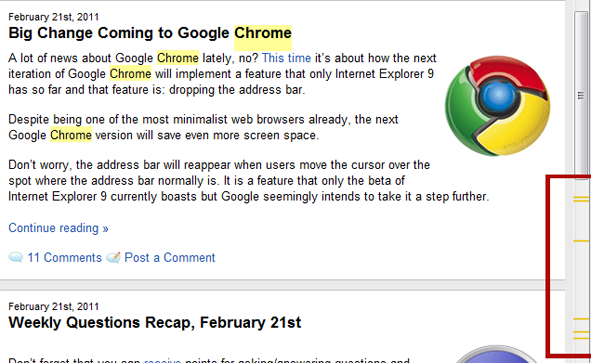
Although I find myself using find function quite often, I haven’t noticed this Google Chrome feature before:
It shows in the scroll bar where the word you’re searching for is located.
Via: Reddit
Weekly Browsers Recap + Bonus Links, February 21st
FavBrowser.com
- IE9 RC: 2 Million Downloads
- Majority Of Web Browsers Are Unpatched
- Director of Firefox Leaves Mozilla
- Firefox 5 First Look
- Firefox 4 RC1 Coming Next Week
- Taking a Look at the New Google Chrome 10 Beta
- Gmail Now Uses Chrome’s Built-In Viewer To Open PDFs
- Introducing Google Chrome Web Search Blocklist Extension
- Download Opera 11.10
- Opera 11.10 Coming
- Windows Phone Internet Explorer 9 Mobile vs. Safari
- Opera Mini for iPad
Weekly Questions Recap, February 21st
Don’t forget that you can receive points for asking/answering questions and redeem them for cool prizes.
Unresolved
- Web-browser battle: which are you using and why?
- Suggest some skin/theme for firefox, opera, chrome?
- Why does Opera fail to grab a good per cent of user base like IE/Firefox/Chrome?
- What was the first browser you ever used?
- Help to Disable Panel While Checking Feeds?
Answered
Introducing Google Chrome Web Search Blocklist Extension
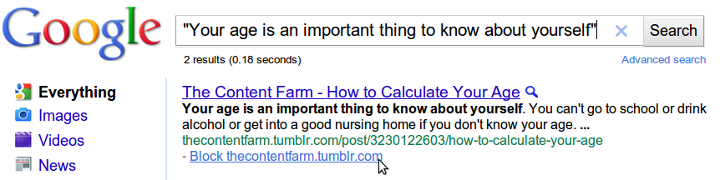
Google, always out to improve their search engine to allow for maximum efficiency, has released the Personal Blocklist extension for Google Chrome which allows users to block certain sites from showing up in their search results.
Weekly Browsers Recap + Bonus Links, February 14th
FavBrowser.com
- Download Internet Explorer 9 RC
- Firefox 5, 6 and 7 Coming in 2011
- Firefox 5 with Windows 64 Bit Support Coming
- Download Firefox 4 Beta 11
- Firefox Ignores Font Family?
- Firefox Borrows Google’s Chrome Update Procedure
- Opera: 100 000 000 Mobile Users
- Download Adobe Flash Player 10.2 Final
- CSS Checkbox Styling Nightmare (Pic)
- HTML5: Framerate Fest


